> ## Documentation Index
> Fetch the complete documentation index at: https://docs.bigdelta.com/llms.txt
> Use this file to discover all available pages before exploring further.
# Changelog
> Latest updates and improvements to Bigdelta.
The final pages land, accounts get smarter default stages, and entitlements return.
## Customer Details
Customer details now uses the new layout for a cleaner, more consistent experience across the app.
## Record Views
Record views are now sortable and use the refreshed layout. Workflows & Emails index and Favorites are also available in the new layout.
### Default Stages for Accounts
Accounts now have sensible default stages out of the box. When product data isn't connected, accounts start as Non-Activated so you always have a clear baseline.
## Improvements
* Account drilldown is now sortable.
* Back-link navigation improvements between detail pages.
## Fixes
* OR filter conditions with relations evaluations.
A redesigned home page, a new workflow creation flow, and a new way to measure revenue at risk.
## Home page redesign
Brand-new home page with KPI tiles, growth components, and a dedicated Funnels tab. Drill into any account directly from chart dots.
 ## Workflows
Redesigned Workflow Creation flow. Workflows and Email Templates are now first-class connected — pick a saved template, edit in draft, and send as transactional email. Email Recipients, the View Email dialog, and the Stats tab also got a refresh with status filter pills and a counts API.
## MRR at Stake
New metric showing revenue exposed to risk, filterable by funnel — so you can see exactly where MRR might slip away.
## Workflow MRR
See the MRR impact of each workflow directly on the workflow itself, grouped by automation run or funnel step. Filter by funnel for a focused view.
## Improvements
* Parallel query processing in reporting for noticeably faster results.
The redesigned app starts rolling out, and Revenue Potential becomes the engine behind MRR forecasting.
## New Layout
Funnels gets a new list, creation dialog, details page, and Overview tab. Records list and Object settings are also redesigned in the new layout.
## Funnel Templates
Spin up common funnels instantly from prebuilt templates.
## Configurable Revenue Potential Status Rules
Manage Revenue Potential status rules in bulk via the UI. Status is now tied to a dynamic ID rather than a static value, giving you more flexible reporting.
## Expected MRR from Revenue Potential
Expected MRR is now driven by Revenue Potential status, with calculations checking historical data for point-in-time accuracy.
## Improvements
* Scoped recalculation — only relevant changes and date ranges recompute, so updates are faster.
* Historical recalculation supported for revenue stages.
* Pinned filters redesigned with correct titles for relation properties.
* Reentry cooldown setting respected in reports.
## Fixes
* Drop-off conditions and historical event reentry corrected.
Funnels gets reporting, automations level up, and three new messaging integrations land.
## Funnel Stats & Summary
See conversion at each step and drop-off rates with the new funnel stats view. A summary report gives a quick overview of funnel performance, and filters are supported across both.
## Workflows
Redesigned Workflow Creation flow. Workflows and Email Templates are now first-class connected — pick a saved template, edit in draft, and send as transactional email. Email Recipients, the View Email dialog, and the Stats tab also got a refresh with status filter pills and a counts API.
## MRR at Stake
New metric showing revenue exposed to risk, filterable by funnel — so you can see exactly where MRR might slip away.
## Workflow MRR
See the MRR impact of each workflow directly on the workflow itself, grouped by automation run or funnel step. Filter by funnel for a focused view.
## Improvements
* Parallel query processing in reporting for noticeably faster results.
The redesigned app starts rolling out, and Revenue Potential becomes the engine behind MRR forecasting.
## New Layout
Funnels gets a new list, creation dialog, details page, and Overview tab. Records list and Object settings are also redesigned in the new layout.
## Funnel Templates
Spin up common funnels instantly from prebuilt templates.
## Configurable Revenue Potential Status Rules
Manage Revenue Potential status rules in bulk via the UI. Status is now tied to a dynamic ID rather than a static value, giving you more flexible reporting.
## Expected MRR from Revenue Potential
Expected MRR is now driven by Revenue Potential status, with calculations checking historical data for point-in-time accuracy.
## Improvements
* Scoped recalculation — only relevant changes and date ranges recompute, so updates are faster.
* Historical recalculation supported for revenue stages.
* Pinned filters redesigned with correct titles for relation properties.
* Reentry cooldown setting respected in reports.
## Fixes
* Drop-off conditions and historical event reentry corrected.
Funnels gets reporting, automations level up, and three new messaging integrations land.
## Funnel Stats & Summary
See conversion at each step and drop-off rates with the new funnel stats view. A summary report gives a quick overview of funnel performance, and filters are supported across both.
 ## Microsoft Teams Integration
Send messages to Teams channels directly from workflows.
## Discord Integration
Send messages to Discord channels directly from workflows.
## HubSpot — Create Task
New "Create task" action for the HubSpot integration so workflows can push follow-ups straight into HubSpot.
## User-Defined Email Templates
Build email templates once and reuse them across workflows.
## Improvements
* Funnel stage event properties usable as variables in templates.
* Choose between label or ID for select, multi-select, stage, and member variables.
* Variables resolve correctly when extensions trigger an automation.
* Consistent sorting between revenue events and subscription updates.
## Fixes
* MRR calculation for cancel-then-renew at the same timestamp.
* Correct subscription IDs for Trial Started events.
The foundation of two big bets: Funnels for tracking customer journeys, and a smarter Revenue Potential engine.
## Funnels
Define funnels with events, activities, drop-off conditions, and per-step probability. Reentry is supported with configurable cooldown windows, and single-event funnels are available for lightweight tracking. Automations can trigger on funnel events, and backfill runs automatically when you create or edit a funnel.
## Microsoft Teams Integration
Send messages to Teams channels directly from workflows.
## Discord Integration
Send messages to Discord channels directly from workflows.
## HubSpot — Create Task
New "Create task" action for the HubSpot integration so workflows can push follow-ups straight into HubSpot.
## User-Defined Email Templates
Build email templates once and reuse them across workflows.
## Improvements
* Funnel stage event properties usable as variables in templates.
* Choose between label or ID for select, multi-select, stage, and member variables.
* Variables resolve correctly when extensions trigger an automation.
* Consistent sorting between revenue events and subscription updates.
## Fixes
* MRR calculation for cancel-then-renew at the same timestamp.
* Correct subscription IDs for Trial Started events.
The foundation of two big bets: Funnels for tracking customer journeys, and a smarter Revenue Potential engine.
## Funnels
Define funnels with events, activities, drop-off conditions, and per-step probability. Reentry is supported with configurable cooldown windows, and single-event funnels are available for lightweight tracking. Automations can trigger on funnel events, and backfill runs automatically when you create or edit a funnel.
 ## Revenue Potential Status
A new Revenue Potential status concept lets you classify accounts by revenue risk and opportunity. Default contraction and status rules are included out of the box.
## Filter by Revenue Potential
Filter accounts and reports by Revenue Potential status to focus on the segments that matter most.
## Fixes
* Manual payment import — date picker and various edge cases.
Your home page and goal tracking get a major upgrade, plus background exports and smoother onboarding.
## Redesigned Home Page
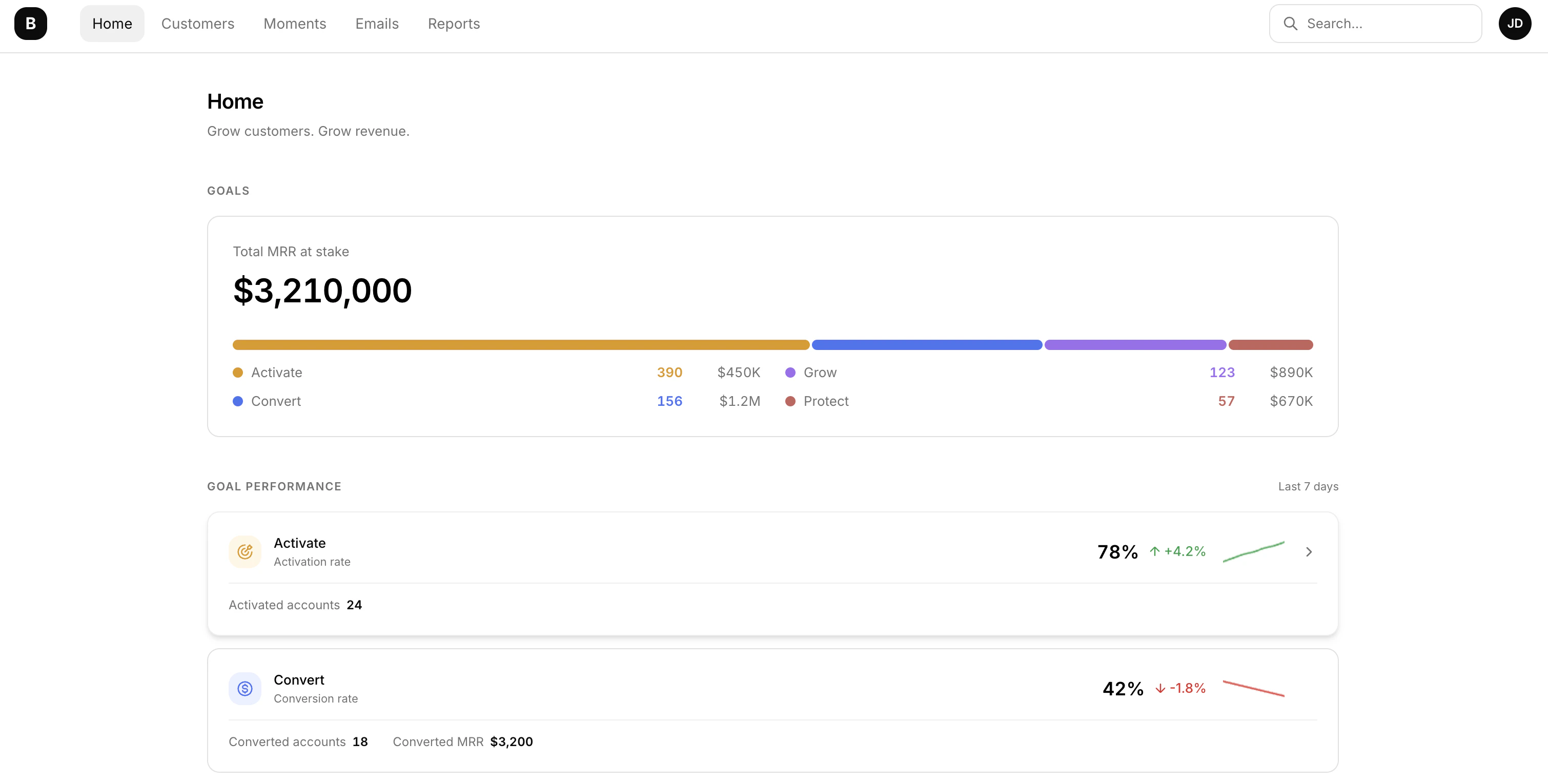
Your home page now puts goals front and center. See how each driving goal is performing with visual performance cards, sparkline trend charts, and success rate indicators — all at a glance. A new "Moments needing attention" section makes sure nothing slips through the cracks.
## Revenue Potential Status
A new Revenue Potential status concept lets you classify accounts by revenue risk and opportunity. Default contraction and status rules are included out of the box.
## Filter by Revenue Potential
Filter accounts and reports by Revenue Potential status to focus on the segments that matter most.
## Fixes
* Manual payment import — date picker and various edge cases.
Your home page and goal tracking get a major upgrade, plus background exports and smoother onboarding.
## Redesigned Home Page
Your home page now puts goals front and center. See how each driving goal is performing with visual performance cards, sparkline trend charts, and success rate indicators — all at a glance. A new "Moments needing attention" section makes sure nothing slips through the cracks.
 ## Goals Page
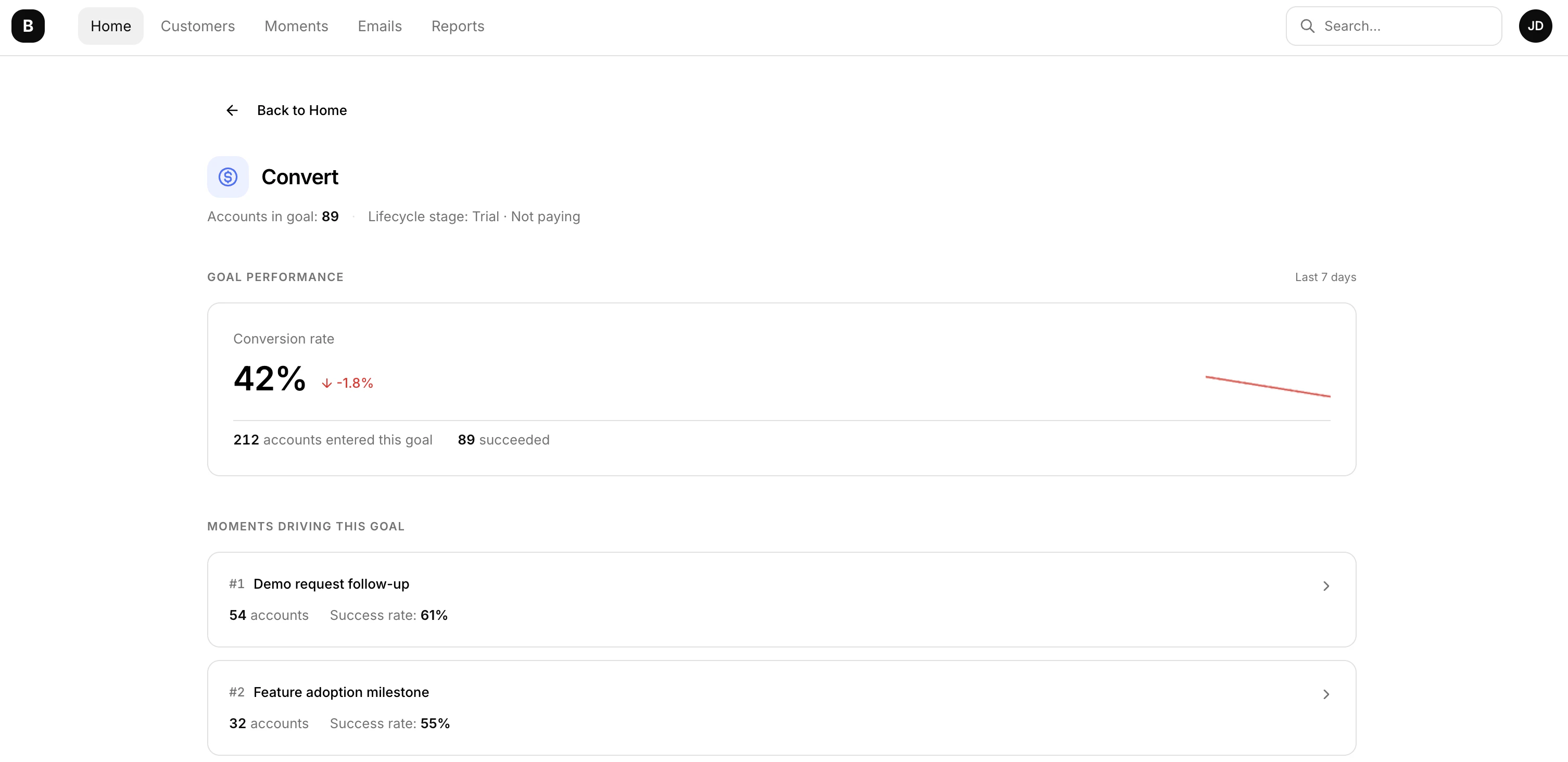
Dive deeper into goal performance with a dedicated Goals page. Track current metrics, view associated moments, analyze loss reasons — all in one place. Goals are automatically ranked by success rate so you can focus where it matters most.
## Goals Page
Dive deeper into goal performance with a dedicated Goals page. Track current metrics, view associated moments, analyze loss reasons — all in one place. Goals are automatically ranked by success rate so you can focus where it matters most.
 ## Status Ribbon
A new status ribbon keeps you informed about your initial payment integration sync status as you navigate the app.
## Async Data Export
Export your records without waiting around. Exports now run in the background, and a new Exports page lets you track progress and download files when they're ready.
## Improvements
* Refreshed onboarding — a smoother onboarding experience with new illustrations, action cards, and a Slack setup panel. All payment integrations (Stripe, PayPal, PayMe, Solidgate, Shopify) now follow a unified summary flow for a more consistent setup.
* More control over your subscription — downgrade tiers, schedule plan changes, and cancel add-ons directly from the Subscription page — no need to contact support.
Automate responses to key customer events with Moments, and track how your emails perform.
## Moments
Lifecycle automation system that triggers actions when important events happen. Comes with default moments for trial activity, product usage, and plan limits.
## Moment Actions
When a moment triggers, automatically take action — send a Slack message, create an Attio task, fire a webhook, or send an email.
## Email Open & Click Tracking
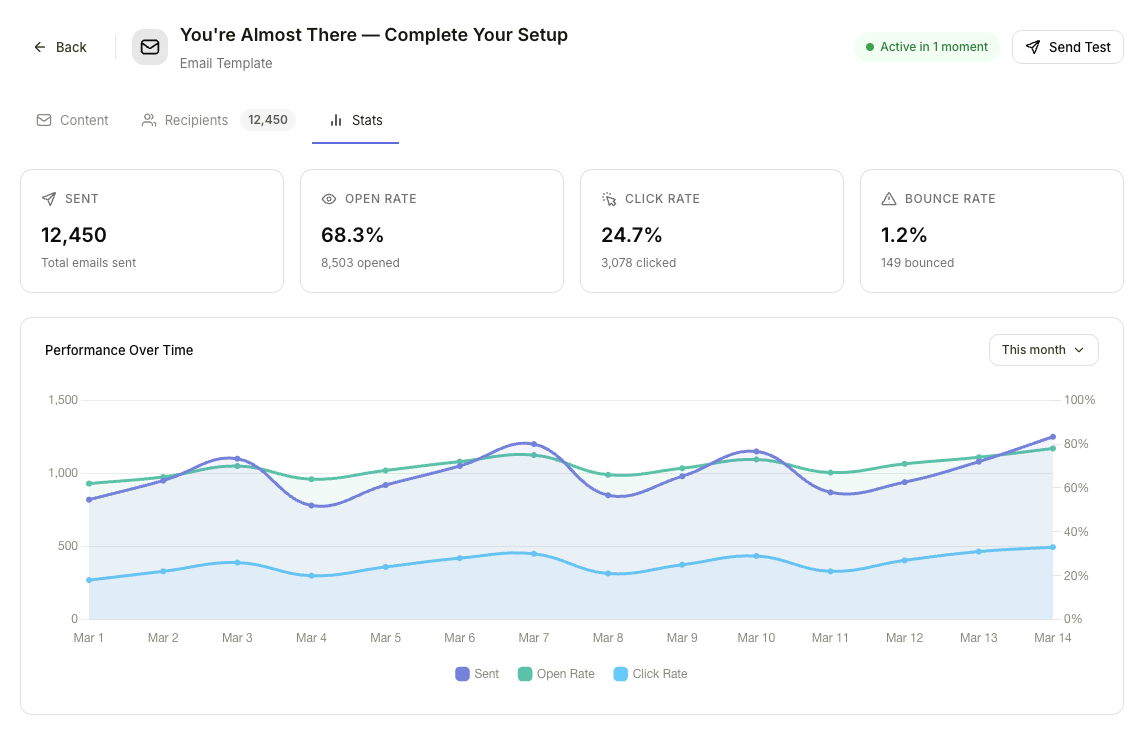
Track when recipients open your emails and click links, so you can measure engagement directly in Bigdelta.
## Status Ribbon
A new status ribbon keeps you informed about your initial payment integration sync status as you navigate the app.
## Async Data Export
Export your records without waiting around. Exports now run in the background, and a new Exports page lets you track progress and download files when they're ready.
## Improvements
* Refreshed onboarding — a smoother onboarding experience with new illustrations, action cards, and a Slack setup panel. All payment integrations (Stripe, PayPal, PayMe, Solidgate, Shopify) now follow a unified summary flow for a more consistent setup.
* More control over your subscription — downgrade tiers, schedule plan changes, and cancel add-ons directly from the Subscription page — no need to contact support.
Automate responses to key customer events with Moments, and track how your emails perform.
## Moments
Lifecycle automation system that triggers actions when important events happen. Comes with default moments for trial activity, product usage, and plan limits.
## Moment Actions
When a moment triggers, automatically take action — send a Slack message, create an Attio task, fire a webhook, or send an email.
## Email Open & Click Tracking
Track when recipients open your emails and click links, so you can measure engagement directly in Bigdelta.
 A new system for defining and tracking account activities, plus a built-in email editor.
## New features
### Activity Definitions
Define and track key account activities across the lifecycle — trial events, payment events, MRR movements, stage changes, product usage, feature adoption, feedback, and entitlements.
### Email Editor
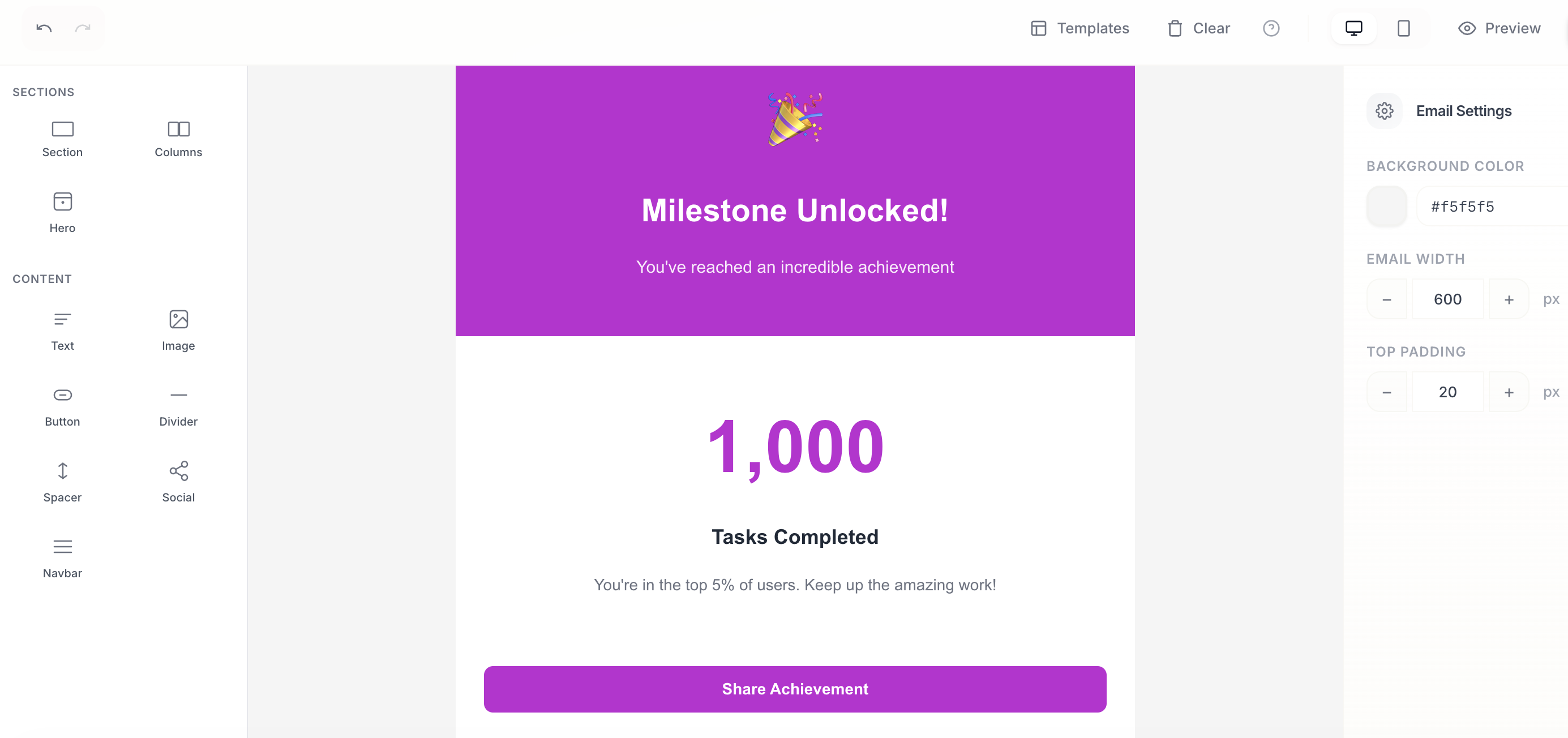
Compose and send emails directly from Bigdelta with the new built-in email editor.
A new system for defining and tracking account activities, plus a built-in email editor.
## New features
### Activity Definitions
Define and track key account activities across the lifecycle — trial events, payment events, MRR movements, stage changes, product usage, feature adoption, feedback, and entitlements.
### Email Editor
Compose and send emails directly from Bigdelta with the new built-in email editor.
 ## Improvements
* Pinned filters in metrics for quicker access to your most-used views.
Expanded payment coverage with new integrations and quality-of-life improvements across the board.
## New features
### Solidgate Integration
Connect your Solidgate account to sync payment data directly into Bigdelta.
## Improvements
* Pinned filters in metrics for quicker access to your most-used views.
Expanded payment coverage with new integrations and quality-of-life improvements across the board.
## New features
### Solidgate Integration
Connect your Solidgate account to sync payment data directly into Bigdelta.
 ### Invoice Syncing for PayPal & Payme
PayPal and Payme integrations now sync invoices alongside existing payment data.
## Improvements
* Stripe sync improvements for more reliable data.
* Smooth chart animations across dashboards and reports.
* Integration connect flow redesigned for a cleaner setup experience.
New dashboards for business reviews, a company object to group accounts, and deeper payment integration.
## New features
### Dashboards
Business review and weekly pulse dashboards to help you stay on top of key metrics at a glance.
### Metric Widgets
Redesigned metric widget with breakdowns, compare mode, and relative time ranges for more flexible analysis.
### Companies
New company object with linked accounts, giving you a top-level view of organizations. MRR is now tracked at the company level.
### Invoice Syncing
Stripe integration now syncs invoices automatically.
## Improvements
* Data model page reworked for clarity.
* New team member invitation flow.
Major update to the product that automates lots of busywork around customers.
## New features
### Bigdelta Agents
AI agents continuously monitor each account to spot meaningful changes without manual work.
### Account Lifecycle Tracking
Automatically track each account's full revenue and product usage journey.
### Invoice Syncing for PayPal & Payme
PayPal and Payme integrations now sync invoices alongside existing payment data.
## Improvements
* Stripe sync improvements for more reliable data.
* Smooth chart animations across dashboards and reports.
* Integration connect flow redesigned for a cleaner setup experience.
New dashboards for business reviews, a company object to group accounts, and deeper payment integration.
## New features
### Dashboards
Business review and weekly pulse dashboards to help you stay on top of key metrics at a glance.
### Metric Widgets
Redesigned metric widget with breakdowns, compare mode, and relative time ranges for more flexible analysis.
### Companies
New company object with linked accounts, giving you a top-level view of organizations. MRR is now tracked at the company level.
### Invoice Syncing
Stripe integration now syncs invoices automatically.
## Improvements
* Data model page reworked for clarity.
* New team member invitation flow.
Major update to the product that automates lots of busywork around customers.
## New features
### Bigdelta Agents
AI agents continuously monitor each account to spot meaningful changes without manual work.
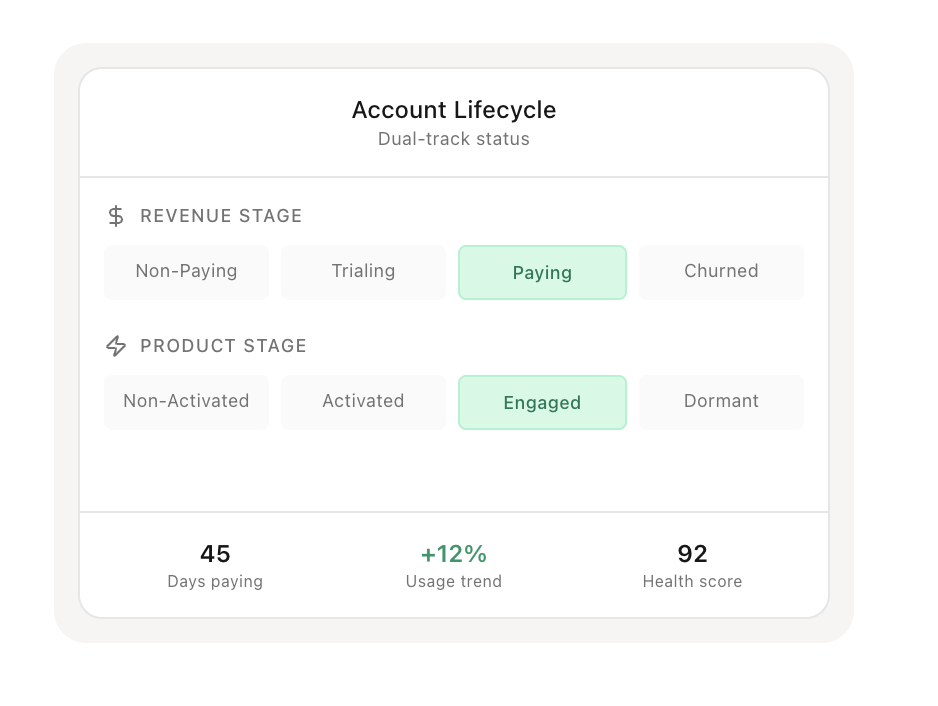
### Account Lifecycle Tracking
Automatically track each account's full revenue and product usage journey.
 ### Updated Profiles
Enhancements for companies, accounts, users, and subscriptions with emphasis on clarity.
### Feedback
Incorporate and evaluate customer feedback directly within the platform.
### Activity Feed
A central place to see what customers are doing using product tracking, feedback and billing data.
## Improvements
* Record view switching relocated from dropdown menu to sidebar navigation.
* Event feed receives a dedicated page.
## Fixes
* Minor bugs addressed.
### Updated Profiles
Enhancements for companies, accounts, users, and subscriptions with emphasis on clarity.
### Feedback
Incorporate and evaluate customer feedback directly within the platform.
### Activity Feed
A central place to see what customers are doing using product tracking, feedback and billing data.
## Improvements
* Record view switching relocated from dropdown menu to sidebar navigation.
* Event feed receives a dedicated page.
## Fixes
* Minor bugs addressed.