> ## Documentation Index
> Fetch the complete documentation index at: https://docs.bigdelta.com/llms.txt
> Use this file to discover all available pages before exploring further.
# Activities
> A complete reference of all system-generated activities that track key customer lifecycle events.
## What are activities?
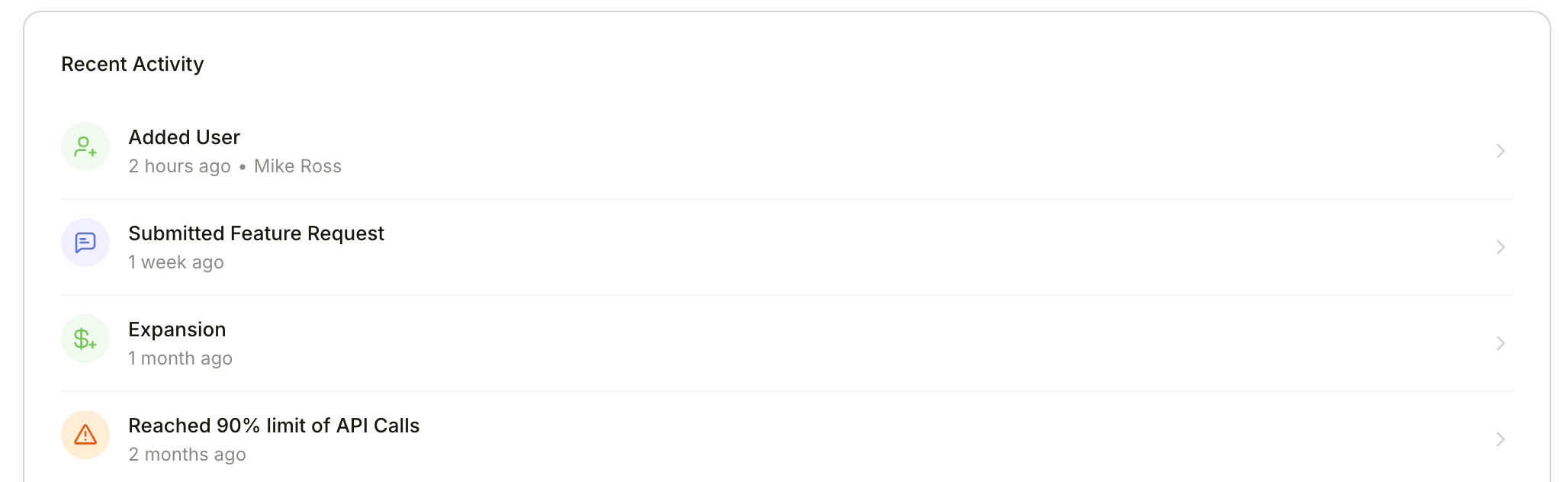
Activities are events automatically created by Bigdelta when important changes happen in your customer data. They capture moments like account creation, trial transitions, revenue movements, payment issues, and product usage changes. Activities power [Moments](/guide/features/moments) triggers and end rules, and appear on account timelines to give you a full picture of what is happening with each customer.
 ***
## How activities are created
Activities are generated automatically by Bigdelta's automation engine when it detects relevant changes in your data. Each activity is linked to an account and includes a category label and contextual properties.
***
## Activity reference
### Account
| Activity | When it is created |
| -------------------- | ------------------------------------------------------------------------------------------------------------------ |
| **Account Creation** | When an account record's `account_since` property is set. The activity timestamp matches the `account_since` date. |
***
### Trial
| Activity | When it is created |
| --------------------- | ---------------------------------------------------------------------------------------------------------------------------------------------- |
| **Trial Started** | When a subscription's status changes to `Trial` or `Reinstated to Trial`. The activity timestamp matches the subscription's period start date. |
| **Trial Ending Soon** | When a subscription's trial period end date is 2 days away or less. The activity timestamp is set to 2 days before the trial ends. |
| **Trial Ended** | When a subscription's status changes from `Trial` or `Reinstated to Trial` to any other status. |
***
### MRR Movements
These activities are created when revenue movement events are processed. Each includes the MRR change amount and a description.
| Activity | When it is created |
| ---------------- | ------------------------------------------------------------------------------------------------------------- |
| **New Business** | When a new MRR event is recorded, representing first revenue from a new customer. |
| **Expansion** | When an expansion MRR event is recorded, representing an increase in revenue from an existing customer. |
| **Contraction** | When a contraction MRR event is recorded, representing a decrease in revenue from an existing customer. |
| **Churn** | When a churn MRR event is recorded, representing a complete loss of revenue from a customer. |
| **Reactivation** | When a reactivation MRR event is recorded, representing revenue returning from a previously churned customer. |
***
### Revenue Stage
These activities are created when an account's [Revenue Stage](/guide/features/revenue-stages) changes.
| Activity | When it is created |
| ---------------------------- | ------------------------------------------------------- |
| **Entered Paying Stage** | When the account's revenue stage changes to Paying. |
| **Entered Trialing Stage** | When the account's revenue stage changes to Trialing. |
| **Entered Non-Paying Stage** | When the account's revenue stage changes to Non-Paying. |
| **Entered Churned Stage** | When the account's revenue stage changes to Churned. |
| **Removed Revenue Stage** | When the account's revenue stage is cleared. |
***
### Product Stage
These activities are created when an account's [Product Stage](/guide/features/product-stages) changes.
| Activity | When it is created |
| ------------------------------- | ---------------------------------------------------------- |
| **Entered Non-Activated Stage** | When the account's product stage changes to Non-Activated. |
| **Entered Activated Stage** | When the account's product stage changes to Activated. |
| **Entered Engaged Stage** | When the account's product stage changes to Engaged. |
| **Entered Dormant Stage** | When the account's product stage changes to Dormant. |
| **Removed Product Stage** | When the account's product stage is cleared. |
***
### Payments
| Activity | When it is created |
| --------------------- | --------------------------------------------------------------------------------------------------------------------------------------------------------------------------- |
| **Payment Failed** | When a payment event is recorded with a failed status. |
| **Payment Recovered** | When a successful payment event is recorded and the most recent prior payment for the same account had failed. This indicates the customer recovered from a failed payment. |
***
### Subscriptions
| Activity | When it is created |
| ------------------------------------- | ----------------------------------------------------------------------------------------------------------------------------------- |
| **Subscription Cancelled** | When a subscription's status changes to Canceled. |
| **Subscription Set To Cancel** | When a subscription's scheduled cancellation date changes from empty to a date value, meaning a cancellation has been scheduled. |
| **Subscription Cancellation Revoked** | When a subscription's scheduled cancellation date changes from a date value to empty, meaning a scheduled cancellation was revoked. |
***
### Product Usage
These activities track changes in product usage and are subject to a **7-day cooldown** — if the same activity type was already created for the same record in the last 7 days, it is skipped. Each includes a change percentage property.
| Activity | When it is created |
| --------------------------- | --------------------------------------------------------------------------- |
| **Product Usage Dropped** | When a record's weekly event count decreased compared to the previous week. |
| **Product Usage Increased** | When a record's weekly event count increased compared to the previous week. |
***
### Users
One activity is created for each individual user added or removed. Each includes the User ID as a property.
| Activity | When it is created |
| ---------------- | ---------------------------------------------------------------------------------- |
| **Added User** | When new user IDs appear in an account's users list that were not there before. |
| **Removed User** | When user IDs are removed from an account's users list that were previously there. |
***
### Feature Adoption
These activities are created when a feature record's adoption status changes. The feature name in the activity comes from the object's display name. Only changes to Tried, Adopted, or Dropped trigger activities — the Never status is ignored, and no activity is created if the status did not actually change.
| Activity | When it is created |
| ----------------------------- | ---------------------------------------------------- |
| **Tried *feature* feature** | When a feature's adoption status changes to Tried. |
| **Adopted *feature* feature** | When a feature's adoption status changes to Adopted. |
| **Dropped *feature* feature** | When a feature's adoption status changes to Dropped. |
***
### Entitlements
These activities are created when entitlement records change. The entitlement name in each activity comes from the object's display name. The behavior depends on the entitlement type.
#### Toggle entitlements
| Activity | When it is created |
| ----------------------------- | ------------------------------------------------------------------------------- |
| **Activated *entitlement*** | When a toggle entitlement's usage status changes to Using. |
| **Deactivated *entitlement*** | When a toggle entitlement's usage status changes from Using to any other value. |
#### Metered and quota entitlements
| Activity | When it is created |
| --------------------------------------- | -------------------------------------------------------------------------------------------- |
| **Started using *entitlement*** | When the entitlement's usage status changes to Using. |
| **Reached 50% limit of *entitlement*** | When the entitlement's usage percentage crosses 50% upward (was below 50%, now at or above). |
| **Reached 90% limit of *entitlement*** | When the entitlement's usage percentage crosses 90% upward. |
| **Reached 100% limit of *entitlement*** | When the entitlement's usage percentage crosses 100% upward. |
Multiple threshold activities can be created at once. For example, if usage jumps from 40% to 95%, both the 50% and 90% activities are created.
***
### Feedback
| Activity | When it is created |
| ----------------------------- | ---------------------------------------------------------------------------------------------------------------------------------------------------------------------------------- |
| **Submitted *feedback type*** | When a feedback record is linked to an account. The feedback type value comes from the record's feedback type property. One activity is created for each newly associated account. |
***
### Plan Limits
| Activity | When it is created |
| ---------------------- | ----------------------------------------------------------- |
| **Plan Limit Reached** | When a plan limit reached event is recorded for an account. |
| **Plan Limit Reset** | When a plan limit reset event is recorded for an account. |
***
## Using activities in Moments
Activities are the primary triggers for [Moments](/guide/features/moments). When configuring a moment's start rule or end rules, you select from the available activity types. For example:
* Start a moment when **Trial Ending Soon** fires, then end it successfully when **New Business** is recorded
* Start a moment when **Payment Failed** fires, then end it successfully when **Payment Recovered** is recorded
* Start a moment when **Product Usage Dropped** fires to proactively engage at-risk accounts
Learn how to create automated playbooks triggered by activities.
***
## How activities are created
Activities are generated automatically by Bigdelta's automation engine when it detects relevant changes in your data. Each activity is linked to an account and includes a category label and contextual properties.
***
## Activity reference
### Account
| Activity | When it is created |
| -------------------- | ------------------------------------------------------------------------------------------------------------------ |
| **Account Creation** | When an account record's `account_since` property is set. The activity timestamp matches the `account_since` date. |
***
### Trial
| Activity | When it is created |
| --------------------- | ---------------------------------------------------------------------------------------------------------------------------------------------- |
| **Trial Started** | When a subscription's status changes to `Trial` or `Reinstated to Trial`. The activity timestamp matches the subscription's period start date. |
| **Trial Ending Soon** | When a subscription's trial period end date is 2 days away or less. The activity timestamp is set to 2 days before the trial ends. |
| **Trial Ended** | When a subscription's status changes from `Trial` or `Reinstated to Trial` to any other status. |
***
### MRR Movements
These activities are created when revenue movement events are processed. Each includes the MRR change amount and a description.
| Activity | When it is created |
| ---------------- | ------------------------------------------------------------------------------------------------------------- |
| **New Business** | When a new MRR event is recorded, representing first revenue from a new customer. |
| **Expansion** | When an expansion MRR event is recorded, representing an increase in revenue from an existing customer. |
| **Contraction** | When a contraction MRR event is recorded, representing a decrease in revenue from an existing customer. |
| **Churn** | When a churn MRR event is recorded, representing a complete loss of revenue from a customer. |
| **Reactivation** | When a reactivation MRR event is recorded, representing revenue returning from a previously churned customer. |
***
### Revenue Stage
These activities are created when an account's [Revenue Stage](/guide/features/revenue-stages) changes.
| Activity | When it is created |
| ---------------------------- | ------------------------------------------------------- |
| **Entered Paying Stage** | When the account's revenue stage changes to Paying. |
| **Entered Trialing Stage** | When the account's revenue stage changes to Trialing. |
| **Entered Non-Paying Stage** | When the account's revenue stage changes to Non-Paying. |
| **Entered Churned Stage** | When the account's revenue stage changes to Churned. |
| **Removed Revenue Stage** | When the account's revenue stage is cleared. |
***
### Product Stage
These activities are created when an account's [Product Stage](/guide/features/product-stages) changes.
| Activity | When it is created |
| ------------------------------- | ---------------------------------------------------------- |
| **Entered Non-Activated Stage** | When the account's product stage changes to Non-Activated. |
| **Entered Activated Stage** | When the account's product stage changes to Activated. |
| **Entered Engaged Stage** | When the account's product stage changes to Engaged. |
| **Entered Dormant Stage** | When the account's product stage changes to Dormant. |
| **Removed Product Stage** | When the account's product stage is cleared. |
***
### Payments
| Activity | When it is created |
| --------------------- | --------------------------------------------------------------------------------------------------------------------------------------------------------------------------- |
| **Payment Failed** | When a payment event is recorded with a failed status. |
| **Payment Recovered** | When a successful payment event is recorded and the most recent prior payment for the same account had failed. This indicates the customer recovered from a failed payment. |
***
### Subscriptions
| Activity | When it is created |
| ------------------------------------- | ----------------------------------------------------------------------------------------------------------------------------------- |
| **Subscription Cancelled** | When a subscription's status changes to Canceled. |
| **Subscription Set To Cancel** | When a subscription's scheduled cancellation date changes from empty to a date value, meaning a cancellation has been scheduled. |
| **Subscription Cancellation Revoked** | When a subscription's scheduled cancellation date changes from a date value to empty, meaning a scheduled cancellation was revoked. |
***
### Product Usage
These activities track changes in product usage and are subject to a **7-day cooldown** — if the same activity type was already created for the same record in the last 7 days, it is skipped. Each includes a change percentage property.
| Activity | When it is created |
| --------------------------- | --------------------------------------------------------------------------- |
| **Product Usage Dropped** | When a record's weekly event count decreased compared to the previous week. |
| **Product Usage Increased** | When a record's weekly event count increased compared to the previous week. |
***
### Users
One activity is created for each individual user added or removed. Each includes the User ID as a property.
| Activity | When it is created |
| ---------------- | ---------------------------------------------------------------------------------- |
| **Added User** | When new user IDs appear in an account's users list that were not there before. |
| **Removed User** | When user IDs are removed from an account's users list that were previously there. |
***
### Feature Adoption
These activities are created when a feature record's adoption status changes. The feature name in the activity comes from the object's display name. Only changes to Tried, Adopted, or Dropped trigger activities — the Never status is ignored, and no activity is created if the status did not actually change.
| Activity | When it is created |
| ----------------------------- | ---------------------------------------------------- |
| **Tried *feature* feature** | When a feature's adoption status changes to Tried. |
| **Adopted *feature* feature** | When a feature's adoption status changes to Adopted. |
| **Dropped *feature* feature** | When a feature's adoption status changes to Dropped. |
***
### Entitlements
These activities are created when entitlement records change. The entitlement name in each activity comes from the object's display name. The behavior depends on the entitlement type.
#### Toggle entitlements
| Activity | When it is created |
| ----------------------------- | ------------------------------------------------------------------------------- |
| **Activated *entitlement*** | When a toggle entitlement's usage status changes to Using. |
| **Deactivated *entitlement*** | When a toggle entitlement's usage status changes from Using to any other value. |
#### Metered and quota entitlements
| Activity | When it is created |
| --------------------------------------- | -------------------------------------------------------------------------------------------- |
| **Started using *entitlement*** | When the entitlement's usage status changes to Using. |
| **Reached 50% limit of *entitlement*** | When the entitlement's usage percentage crosses 50% upward (was below 50%, now at or above). |
| **Reached 90% limit of *entitlement*** | When the entitlement's usage percentage crosses 90% upward. |
| **Reached 100% limit of *entitlement*** | When the entitlement's usage percentage crosses 100% upward. |
Multiple threshold activities can be created at once. For example, if usage jumps from 40% to 95%, both the 50% and 90% activities are created.
***
### Feedback
| Activity | When it is created |
| ----------------------------- | ---------------------------------------------------------------------------------------------------------------------------------------------------------------------------------- |
| **Submitted *feedback type*** | When a feedback record is linked to an account. The feedback type value comes from the record's feedback type property. One activity is created for each newly associated account. |
***
### Plan Limits
| Activity | When it is created |
| ---------------------- | ----------------------------------------------------------- |
| **Plan Limit Reached** | When a plan limit reached event is recorded for an account. |
| **Plan Limit Reset** | When a plan limit reset event is recorded for an account. |
***
## Using activities in Moments
Activities are the primary triggers for [Moments](/guide/features/moments). When configuring a moment's start rule or end rules, you select from the available activity types. For example:
* Start a moment when **Trial Ending Soon** fires, then end it successfully when **New Business** is recorded
* Start a moment when **Payment Failed** fires, then end it successfully when **Payment Recovered** is recorded
* Start a moment when **Product Usage Dropped** fires to proactively engage at-risk accounts
Learn how to create automated playbooks triggered by activities.