> ## Documentation Index
> Fetch the complete documentation index at: https://docs.bigdelta.com/llms.txt
> Use this file to discover all available pages before exploring further.
# Product Stages
> Understand how Bigdelta categorizes your customers by their product engagement level.
## What are Product Stages?
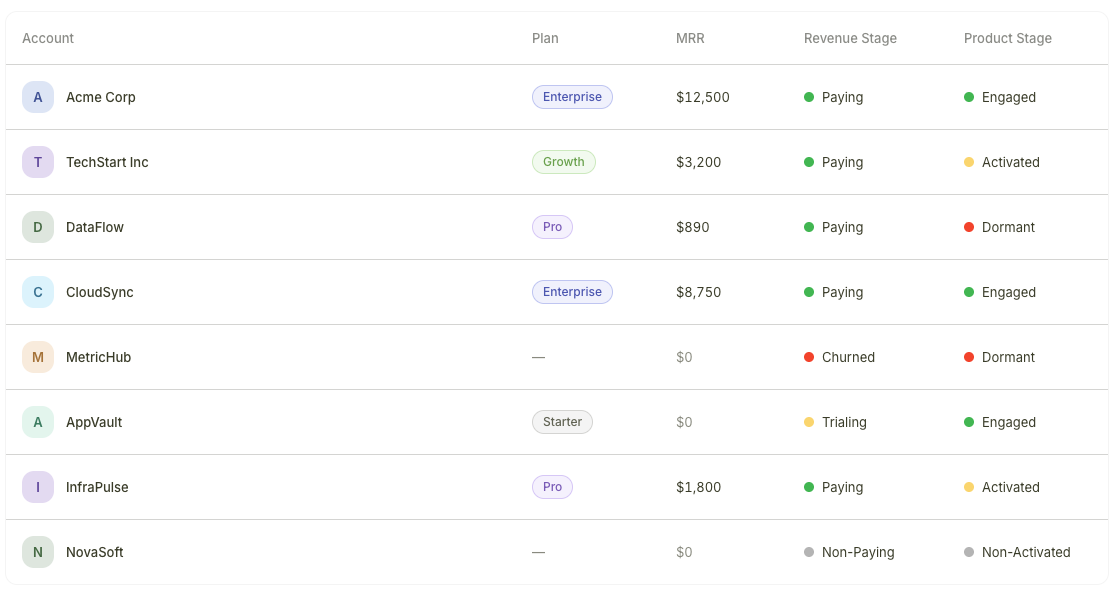 Product Stages reflect how actively an account is using your product. While [Revenue Stages](/guide/features/revenue-stages) tell you about payment status, Product Stages tell you about behavior — whether a customer has adopted your product, is using it regularly, or has gone quiet.
Product Stages are calculated from product usage data and events sent to Bigdelta through your tracking integration.
***
## The four Product Stages
| Stage | Meaning |
| ----------------- | --------------------------------------------------------------------------------- |
| **Engaged** | The account is actively using the product with healthy usage patterns |
| **Activated** | The account has completed key activation actions but may not be fully engaged yet |
| **Non-Activated** | The account has signed up but has not yet completed key activation actions |
| **Dormant** | The account has become inactive with little to no recent usage |
***
## How Product Stages are calculated
Product Stages are derived from the events and usage data that your product sends to Bigdelta. As user activity changes, stages update automatically:
* A new user signs up but has not performed key actions — **Non-Activated**
* The user completes activation steps — **Activated**
* The user shows consistent, healthy usage — **Engaged**
* Activity drops off significantly — **Dormant**
Product Stages require event tracking to be set up. You need to install your tracking key in your product so that usage data flows into Bigdelta. Without event data, Product Stages cannot be calculated.
***
## Where Product Stages appear
Product Stages are visible in two places:
1. **Accounts list** — A stage column appears in the table view, so you can scan engagement levels across all accounts
2. **Account profiles** — The stage is displayed on each individual account's profile page
You can filter and sort by Product Stage in any account view.
***
## Product Stages vs. Revenue Stages
Product Stages tell you about product engagement, while [Revenue Stages](/guide/features/revenue-stages) tell you about payment status. Together they give you the full picture of account health.
Learn how to combine both stage types to identify churn risks, conversion candidates, and expansion opportunities.
***
## Getting started with Product Stages
Add the Bigdelta tracking key to your product so that usage events are sent to your workspace.
Check the Events tab on any account profile to confirm that product usage data is being received.
Once events are flowing, Product Stages will be calculated and assigned automatically. View them in your accounts list or on individual profiles.
Product Stages reflect how actively an account is using your product. While [Revenue Stages](/guide/features/revenue-stages) tell you about payment status, Product Stages tell you about behavior — whether a customer has adopted your product, is using it regularly, or has gone quiet.
Product Stages are calculated from product usage data and events sent to Bigdelta through your tracking integration.
***
## The four Product Stages
| Stage | Meaning |
| ----------------- | --------------------------------------------------------------------------------- |
| **Engaged** | The account is actively using the product with healthy usage patterns |
| **Activated** | The account has completed key activation actions but may not be fully engaged yet |
| **Non-Activated** | The account has signed up but has not yet completed key activation actions |
| **Dormant** | The account has become inactive with little to no recent usage |
***
## How Product Stages are calculated
Product Stages are derived from the events and usage data that your product sends to Bigdelta. As user activity changes, stages update automatically:
* A new user signs up but has not performed key actions — **Non-Activated**
* The user completes activation steps — **Activated**
* The user shows consistent, healthy usage — **Engaged**
* Activity drops off significantly — **Dormant**
Product Stages require event tracking to be set up. You need to install your tracking key in your product so that usage data flows into Bigdelta. Without event data, Product Stages cannot be calculated.
***
## Where Product Stages appear
Product Stages are visible in two places:
1. **Accounts list** — A stage column appears in the table view, so you can scan engagement levels across all accounts
2. **Account profiles** — The stage is displayed on each individual account's profile page
You can filter and sort by Product Stage in any account view.
***
## Product Stages vs. Revenue Stages
Product Stages tell you about product engagement, while [Revenue Stages](/guide/features/revenue-stages) tell you about payment status. Together they give you the full picture of account health.
Learn how to combine both stage types to identify churn risks, conversion candidates, and expansion opportunities.
***
## Getting started with Product Stages
Add the Bigdelta tracking key to your product so that usage events are sent to your workspace.
Check the Events tab on any account profile to confirm that product usage data is being received.
Once events are flowing, Product Stages will be calculated and assigned automatically. View them in your accounts list or on individual profiles.