> ## Documentation Index
> Fetch the complete documentation index at: https://docs.bigdelta.com/llms.txt
> Use this file to discover all available pages before exploring further.
# Record profiles
> View and edit detailed record profiles, including all available tabs and properties.
## Viewing a record profile
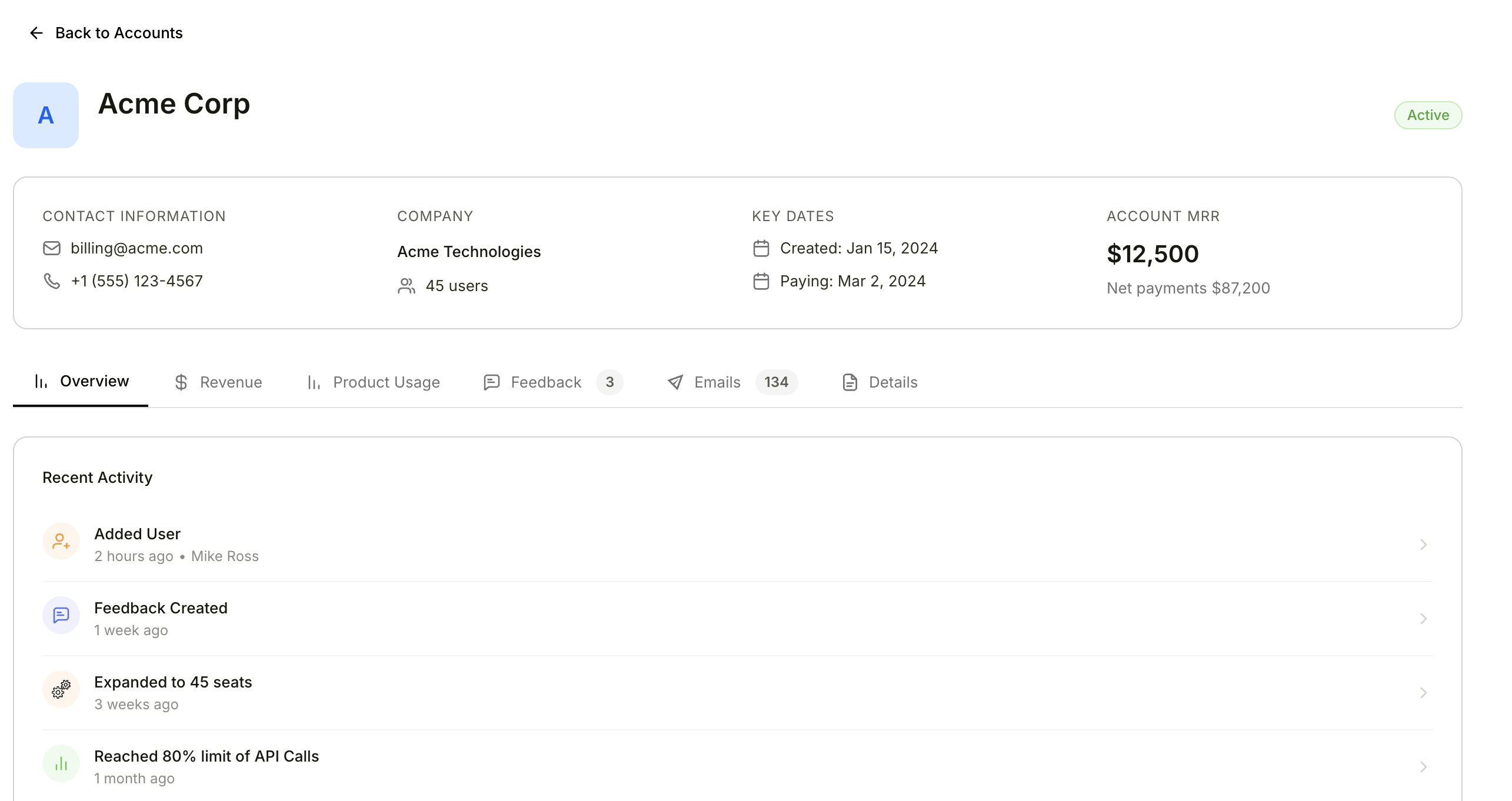 Click any record in a list to open its full profile page. The profile gives you a complete view of everything related to that record.
### Header
The top of the profile page includes:
* **Record name and icon** — The primary identifier for the record
* **Activity status indicator** — Shows whether the record is active or inactive
* **Quick action buttons** — Perform common actions like Send Email and Analyze with AI directly from the header
* **Favorite button** — Click the star icon to save this record for quick access from your Favorites
### Profile tabs
The profile page is organized into tabs. The available tabs depend on the record type.
#### Account tabs
| Tab | Description |
| ----------------- | ------------------------------------------------------------------------------------------------------------------------------- |
| **Overview** | Key metrics, revenue outlook, and recent activity summary |
| **Revenue** | MRR chart, subscriptions, billing history, and transactions. See [Account revenue](/guide/features/account-revenue) for details |
| **Product Usage** | Product usage metrics and activity data |
| **Feedback** | Customer feedback related to this account |
| **Sent Emails** | History of emails sent to this account |
| **Details** | All record properties displayed in an editable grid |
#### User tabs
| Tab | Description |
| ----------------- | --------------------------------------------------- |
| **Overview** | Key metrics and recent activity summary |
| **Product Usage** | Product usage metrics and activity data |
| **Feedback** | Customer feedback related to this user |
| **Sent Emails** | History of emails sent to this user |
| **Details** | All record properties displayed in an editable grid |
#### Company tabs
| Tab | Description |
| ------------------- | --------------------------------------------------- |
| **Linked Accounts** | Accounts associated with this company |
| **Feedback** | Customer feedback related to this company |
| **Details** | All record properties displayed in an editable grid |
#### Subscription tabs
| Tab | Description |
| ----------- | --------------------------------------------------- |
| **Revenue** | Revenue data for this subscription |
| **Details** | All record properties displayed in an editable grid |
#### Feedback tabs
| Tab | Description |
| -------------------- | --------------------------------------------------- |
| **Feedback Content** | The feedback content and context |
| **Details** | All record properties displayed in an editable grid |
The **Overview** tab is a great starting point when reviewing an account. It gives you the most important information at a glance before you dive into specific tabs.
***
## Editing record properties
1. Open a record profile
2. Go to the **Details** tab
3. Click on any editable field to modify it
4. Changes save automatically
Some fields are marked as read-only and cannot be edited directly. These are typically fields that are synced automatically from an integration like your billing system.
Click any record in a list to open its full profile page. The profile gives you a complete view of everything related to that record.
### Header
The top of the profile page includes:
* **Record name and icon** — The primary identifier for the record
* **Activity status indicator** — Shows whether the record is active or inactive
* **Quick action buttons** — Perform common actions like Send Email and Analyze with AI directly from the header
* **Favorite button** — Click the star icon to save this record for quick access from your Favorites
### Profile tabs
The profile page is organized into tabs. The available tabs depend on the record type.
#### Account tabs
| Tab | Description |
| ----------------- | ------------------------------------------------------------------------------------------------------------------------------- |
| **Overview** | Key metrics, revenue outlook, and recent activity summary |
| **Revenue** | MRR chart, subscriptions, billing history, and transactions. See [Account revenue](/guide/features/account-revenue) for details |
| **Product Usage** | Product usage metrics and activity data |
| **Feedback** | Customer feedback related to this account |
| **Sent Emails** | History of emails sent to this account |
| **Details** | All record properties displayed in an editable grid |
#### User tabs
| Tab | Description |
| ----------------- | --------------------------------------------------- |
| **Overview** | Key metrics and recent activity summary |
| **Product Usage** | Product usage metrics and activity data |
| **Feedback** | Customer feedback related to this user |
| **Sent Emails** | History of emails sent to this user |
| **Details** | All record properties displayed in an editable grid |
#### Company tabs
| Tab | Description |
| ------------------- | --------------------------------------------------- |
| **Linked Accounts** | Accounts associated with this company |
| **Feedback** | Customer feedback related to this company |
| **Details** | All record properties displayed in an editable grid |
#### Subscription tabs
| Tab | Description |
| ----------- | --------------------------------------------------- |
| **Revenue** | Revenue data for this subscription |
| **Details** | All record properties displayed in an editable grid |
#### Feedback tabs
| Tab | Description |
| -------------------- | --------------------------------------------------- |
| **Feedback Content** | The feedback content and context |
| **Details** | All record properties displayed in an editable grid |
The **Overview** tab is a great starting point when reviewing an account. It gives you the most important information at a glance before you dive into specific tabs.
***
## Editing record properties
1. Open a record profile
2. Go to the **Details** tab
3. Click on any editable field to modify it
4. Changes save automatically
Some fields are marked as read-only and cannot be edited directly. These are typically fields that are synced automatically from an integration like your billing system.