> ## Documentation Index
> Fetch the complete documentation index at: https://docs.bigdelta.com/llms.txt
> Use this file to discover all available pages before exploring further.
# Product Stages vs. Revenue Stages
> Understand the difference between payment-based and engagement-based account stages.
## Two dimensions of account health
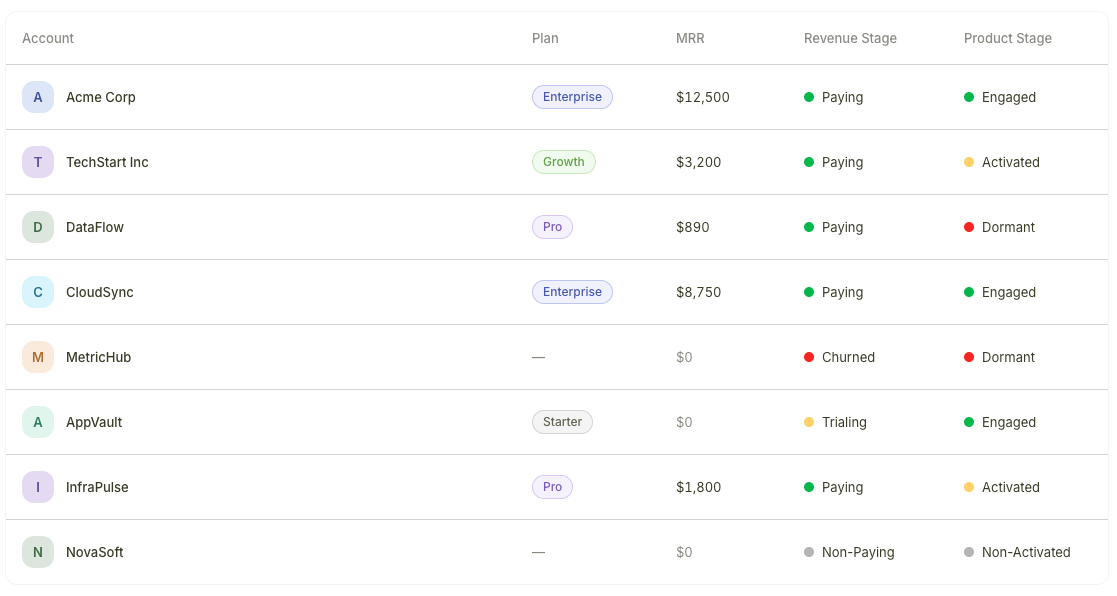 Bigdelta assigns each account two independent stages that together give you a complete picture of customer health:
* **Revenue Stages** reflect **payment status** — whether an account is paying, trialing, or has churned
* **Product Stages** reflect **product engagement** — whether an account is actively using your product or has gone quiet
| | Revenue Stages | Product Stages |
| ------------ | ---------------------------------------------- | --------------------------------------------------- |
| **Based on** | Billing data from your payment provider | Product usage events from your tracking integration |
| **Setup** | Automatic once a payment provider is connected | Requires event tracking to be installed |
| **Stages** | Paying, Trialing, Non-Paying, Churned | Engaged, Activated, Non-Activated, Dormant |
***
## Why both matter
Each dimension tells you something the other cannot. The most actionable insights come from combining them:
| Revenue Stage | Product Stage | What it means | Suggested action |
| ------------- | ----------------- | ----------------------------------------------------- | ----------------------------------------- |
| **Paying** | **Engaged** | Healthy account — paying and using the product | Monitor for expansion opportunities |
| **Paying** | **Dormant** | Churn risk — paying but not using the product | Reach out to re-engage before they cancel |
| **Trialing** | **Engaged** | Strong conversion candidate — actively exploring | Nurture toward a paid plan |
| **Trialing** | **Non-Activated** | At-risk trial — signed up but not using the product | Trigger onboarding nudges |
| **Churned** | **Engaged** | Win-back opportunity — cancelled but still logging in | Reach out with a tailored offer |
Create saved views filtered by stage combinations to keep your highest-priority segments visible. For example, a "Paying + Dormant" view surfaces churn risks, and a "Trialing + Engaged" view highlights your best conversion candidates.
***
## Where stages appear
Both Revenue Stages and Product Stages are visible in:
1. **Accounts list** — Stage columns appear in the table view for scanning at a glance
2. **Account profiles** — Both stages are displayed on each account's profile page
You can filter and sort by either stage in any account view.
***
## Learn more
* [Revenue Stages](/guide/features/revenue-stages) — how payment-based stages are assigned
* [Product Stages](/guide/features/product-stages) — how engagement-based stages are calculated
Bigdelta assigns each account two independent stages that together give you a complete picture of customer health:
* **Revenue Stages** reflect **payment status** — whether an account is paying, trialing, or has churned
* **Product Stages** reflect **product engagement** — whether an account is actively using your product or has gone quiet
| | Revenue Stages | Product Stages |
| ------------ | ---------------------------------------------- | --------------------------------------------------- |
| **Based on** | Billing data from your payment provider | Product usage events from your tracking integration |
| **Setup** | Automatic once a payment provider is connected | Requires event tracking to be installed |
| **Stages** | Paying, Trialing, Non-Paying, Churned | Engaged, Activated, Non-Activated, Dormant |
***
## Why both matter
Each dimension tells you something the other cannot. The most actionable insights come from combining them:
| Revenue Stage | Product Stage | What it means | Suggested action |
| ------------- | ----------------- | ----------------------------------------------------- | ----------------------------------------- |
| **Paying** | **Engaged** | Healthy account — paying and using the product | Monitor for expansion opportunities |
| **Paying** | **Dormant** | Churn risk — paying but not using the product | Reach out to re-engage before they cancel |
| **Trialing** | **Engaged** | Strong conversion candidate — actively exploring | Nurture toward a paid plan |
| **Trialing** | **Non-Activated** | At-risk trial — signed up but not using the product | Trigger onboarding nudges |
| **Churned** | **Engaged** | Win-back opportunity — cancelled but still logging in | Reach out with a tailored offer |
Create saved views filtered by stage combinations to keep your highest-priority segments visible. For example, a "Paying + Dormant" view surfaces churn risks, and a "Trialing + Engaged" view highlights your best conversion candidates.
***
## Where stages appear
Both Revenue Stages and Product Stages are visible in:
1. **Accounts list** — Stage columns appear in the table view for scanning at a glance
2. **Account profiles** — Both stages are displayed on each account's profile page
You can filter and sort by either stage in any account view.
***
## Learn more
* [Revenue Stages](/guide/features/revenue-stages) — how payment-based stages are assigned
* [Product Stages](/guide/features/product-stages) — how engagement-based stages are calculated