
Heatmaps & Filters
See where visitors click, and slice every view by the traffic you care about.
Heatmaps
Click heatmaps show where visitors interact on each page, rendered over a live screenshot of the page. Pick a page from a dropdown sorted by most-clicked, and switch between desktop and mobile widths to see how behavior differs by screen size.Filters everywhere
Pinned filters now work on the Overview, in Heatmaps, and in Replays, so you can look at a single campaign, country, or referrer across all of them. On the Overview, filters can be saved as views, and clicking a row in any breakdown table applies it as a filter.Replay sampling
A new Session Replay settings page lets you choose what share of sessions gets recorded, so you can keep replays on without capturing everything.Improvements
- Setup instructions added for installing the snippet via Shopify and Google Tag Manager.
Session Replays
See what visitors actually did, not just what they triggered.
Replays
Watch recordings of real sessions: play, pause, seek, speed up to 8×, and skip inactive stretches. Sessions spanning multiple tabs let you switch between windows. Recordings also live on each visitor’s profile.Input values are always masked, andbigdelta-mask / bigdelta-block classes plus selector-based config give you full control over what gets captured.Visitor Profiles & Activity Feed
Every visitor now has a story you can read in one place.
Anonymous-to-identified merge
Visitors are tracked anonymously from their first page view. When you identify them on signup or login, their anonymous history merges into the identified record, so nothing from before the login is lost.User profiles
User profiles reorganized into Overview, Activities, and Details tabs. The Activities tab is a full timeline of everything a visitor did — page views, actions, and custom events — with All, Product, and Revenue filters.Improvements
- Global search now surfaces recently visited records.
- Profile header shows created and last-edited dates at a glance.
Simpler Signup & AI Setup
Getting started is faster than ever.
Simpler signup
Creating an account now takes an email and a website domain. Tell us what site you want to track and your workspace is named after it — role and company questionnaires are gone.Improvements
- AI setup: pick your technology (Lovable, Replit, Base44, Claude Code, Codex, Cursor) and get a ready-made prompt with your tracking key baked in.
- Bigdelta detects your first incoming events automatically and confirms when your site is sending data.
New Navigation & Traffic Views
The app reorganized around how you explore your traffic.
New navigation
A new sidebar with three sections: Traffic (Overview, Map, Users, Events, UTM), Behavior (Funnels), and Growth (Workflows). Search, favorites, and your profile sit at the bottom.Traffic views
- Overview — your website’s numbers at a glance.
- Map — where your visitors are located, as a heatmap or bubbles.
- Events — a live stream of everything happening on your site.
- UTM — traffic broken down by campaign parameters.
Improvements
- Narrow screens get a horizontal top navigation with the same sections.
Bigdelta is Web Analytics
A new direction: know every visitor to your site.
Web analytics
Bigdelta is now built around your website traffic. Add one tracking snippet and page views, traffic sources, and visitor context start flowing — no event setup required. Every visitor gets a profile with their full history, anonymous by default.Tracking SDK
The browser SDK captures page views (including single-page-app route changes), custom events, and marketing attribution. Every event carries referrer, device, browser, and OS context automatically.Improvements
- Any email address works at signup — a company email is no longer required.
- Revenue features now build on top of web analytics: connect a payment provider and payments appear alongside visitor activity.
Polish & Account Stages
The final pages land, accounts get smarter default stages, and entitlements return.
Customer Details
Customer details now uses the new layout for a cleaner, more consistent experience across the app.Record Views
Record views are now sortable and use the refreshed layout. Workflows & Emails index and Favorites are also available in the new layout.Default Stages for Accounts
Accounts now have sensible default stages out of the box. When product data isn’t connected, accounts start as Non-Activated so you always have a clear baseline.Improvements
- Account drilldown is now sortable.
- Back-link navigation improvements between detail pages.
Fixes
- OR filter conditions with relations evaluations.
Home, Workflows & MRR at Stake
A redesigned home page, a new workflow creation flow, and a new way to measure revenue at risk.
Home page redesign
Brand-new home page with KPI tiles, growth components, and a dedicated Funnels tab. Drill into any account directly from chart dots.Workflows
Redesigned Workflow Creation flow. Workflows and Email Templates are now first-class connected — pick a saved template, edit in draft, and send as transactional email. Email Recipients, the View Email dialog, and the Stats tab also got a refresh with status filter pills and a counts API.MRR at Stake
New metric showing revenue exposed to risk, filterable by funnel — so you can see exactly where MRR might slip away.Workflow MRR
See the MRR impact of each workflow directly on the workflow itself, grouped by automation run or funnel step. Filter by funnel for a focused view.Improvements
- Parallel query processing in reporting for noticeably faster results.
Layout & Smarter Revenue Potential
The redesigned app starts rolling out, and Revenue Potential becomes the engine behind MRR forecasting.
New Layout
Funnels gets a new list, creation dialog, details page, and Overview tab. Records list and Object settings are also redesigned in the new layout.Funnel Templates
Spin up common funnels instantly from prebuilt templates.Configurable Revenue Potential Status Rules
Manage Revenue Potential status rules in bulk via the UI. Status is now tied to a dynamic ID rather than a static value, giving you more flexible reporting.Expected MRR from Revenue Potential
Expected MRR is now driven by Revenue Potential status, with calculations checking historical data for point-in-time accuracy.Improvements
- Scoped recalculation — only relevant changes and date ranges recompute, so updates are faster.
- Historical recalculation supported for revenue stages.
- Pinned filters redesigned with correct titles for relation properties.
- Reentry cooldown setting respected in reports.
Fixes
- Drop-off conditions and historical event reentry corrected.
Funnel Reporting & New Integrations
Funnels gets reporting, automations level up, and three new messaging integrations land.
Funnel Stats & Summary
See conversion at each step and drop-off rates with the new funnel stats view. A summary report gives a quick overview of funnel performance, and filters are supported across both.Microsoft Teams Integration
Send messages to Teams channels directly from workflows.Discord Integration
Send messages to Discord channels directly from workflows.HubSpot — Create Task
New “Create task” action for the HubSpot integration so workflows can push follow-ups straight into HubSpot.User-Defined Email Templates
Build email templates once and reuse them across workflows.Improvements
- Funnel stage event properties usable as variables in templates.
- Choose between label or ID for select, multi-select, stage, and member variables.
- Variables resolve correctly when extensions trigger an automation.
- Consistent sorting between revenue events and subscription updates.
Fixes
- MRR calculation for cancel-then-renew at the same timestamp.
- Correct subscription IDs for Trial Started events.
Funnels & Revenue Potential
The foundation of two big bets: Funnels for tracking customer journeys, and a smarter Revenue Potential engine.
Funnels
Define funnels with events, activities, drop-off conditions, and per-step probability. Reentry is supported with configurable cooldown windows, and single-event funnels are available for lightweight tracking. Automations can trigger on funnel events, and backfill runs automatically when you create or edit a funnel.Revenue Potential Status
A new Revenue Potential status concept lets you classify accounts by revenue risk and opportunity. Default contraction and status rules are included out of the box.Filter by Revenue Potential
Filter accounts and reports by Revenue Potential status to focus on the segments that matter most.Fixes
- Manual payment import — date picker and various edge cases.
Goals, Home Redesign & Async Exports
Your home page and goal tracking get a major upgrade, plus background exports and smoother onboarding.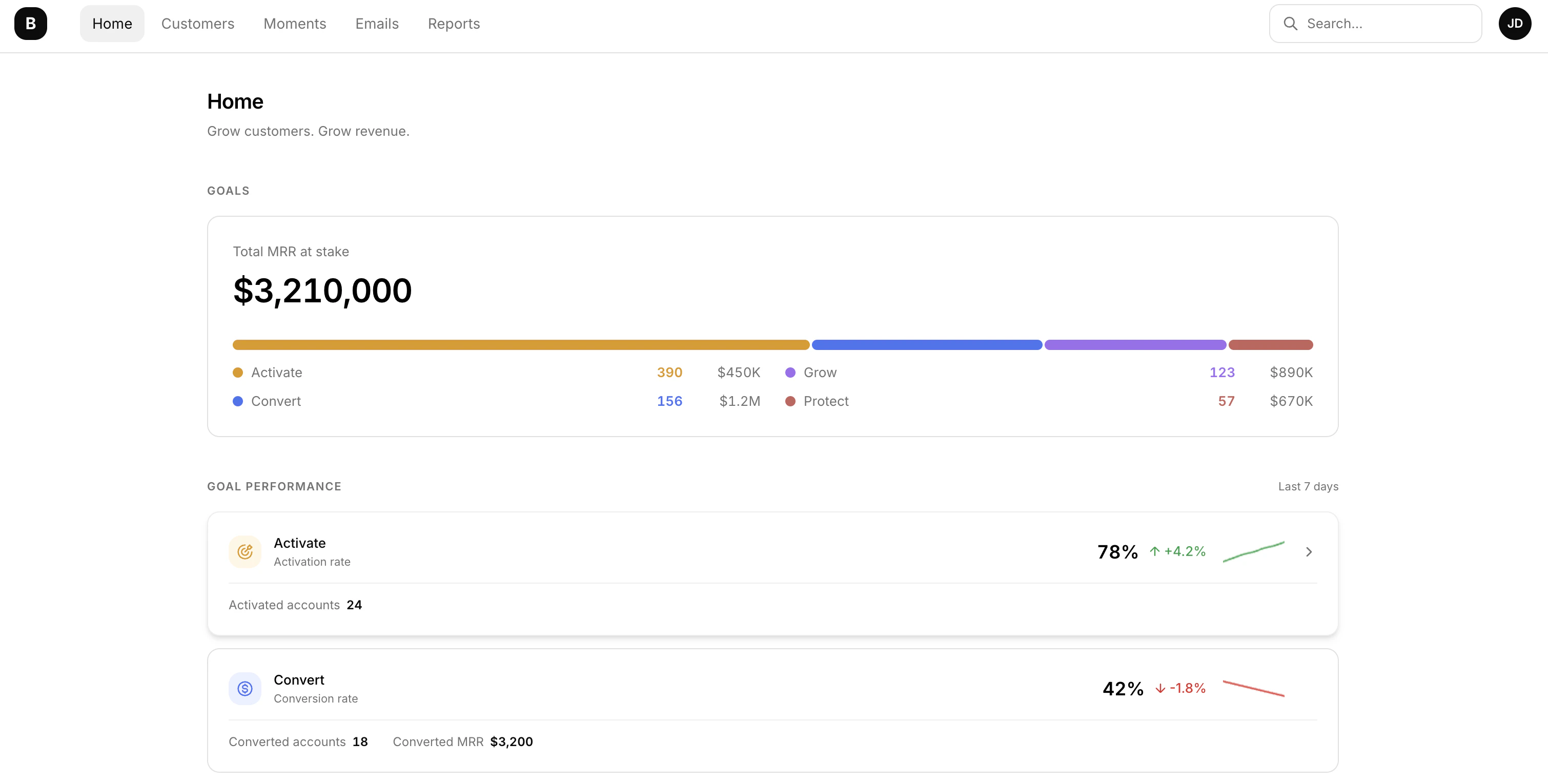
Redesigned Home Page
Your home page now puts goals front and center. See how each driving goal is performing with visual performance cards, sparkline trend charts, and success rate indicators — all at a glance. A new “Moments needing attention” section makes sure nothing slips through the cracks.Goals Page
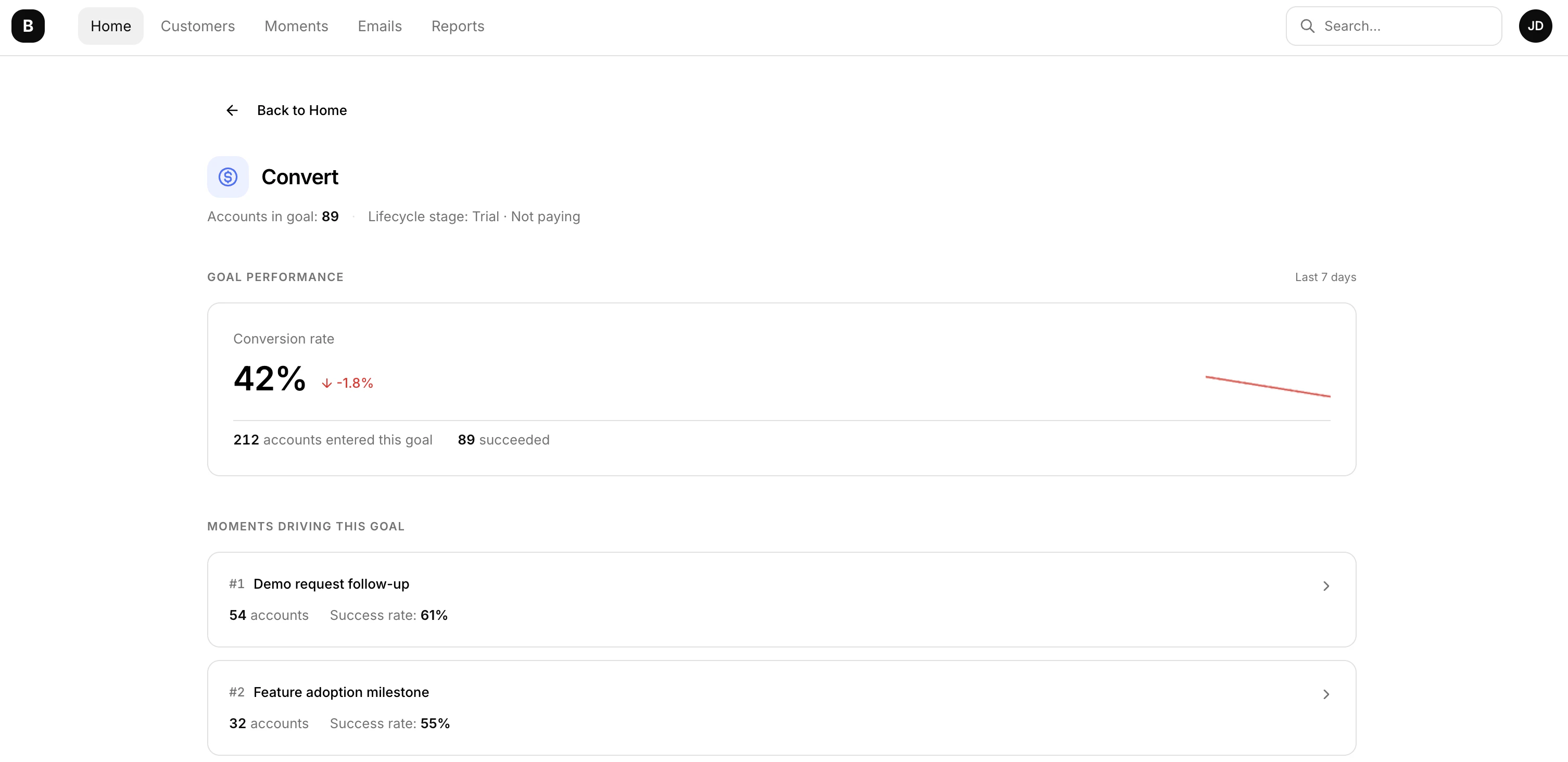
Dive deeper into goal performance with a dedicated Goals page. Track current metrics, view associated moments, analyze loss reasons — all in one place. Goals are automatically ranked by success rate so you can focus where it matters most.Status Ribbon
A new status ribbon keeps you informed about your initial payment integration sync status as you navigate the app.Async Data Export
Export your records without waiting around. Exports now run in the background, and a new Exports page lets you track progress and download files when they’re ready.Improvements
- Refreshed onboarding — a smoother onboarding experience with new illustrations, action cards, and a Slack setup panel. All payment integrations (Stripe, PayPal, PayMe, Solidgate, Shopify) now follow a unified summary flow for a more consistent setup.
- More control over your subscription — downgrade tiers, schedule plan changes, and cancel add-ons directly from the Subscription page — no need to contact support.
Moments & Email Tracking
Automate responses to key customer events with Moments, and track how your emails perform.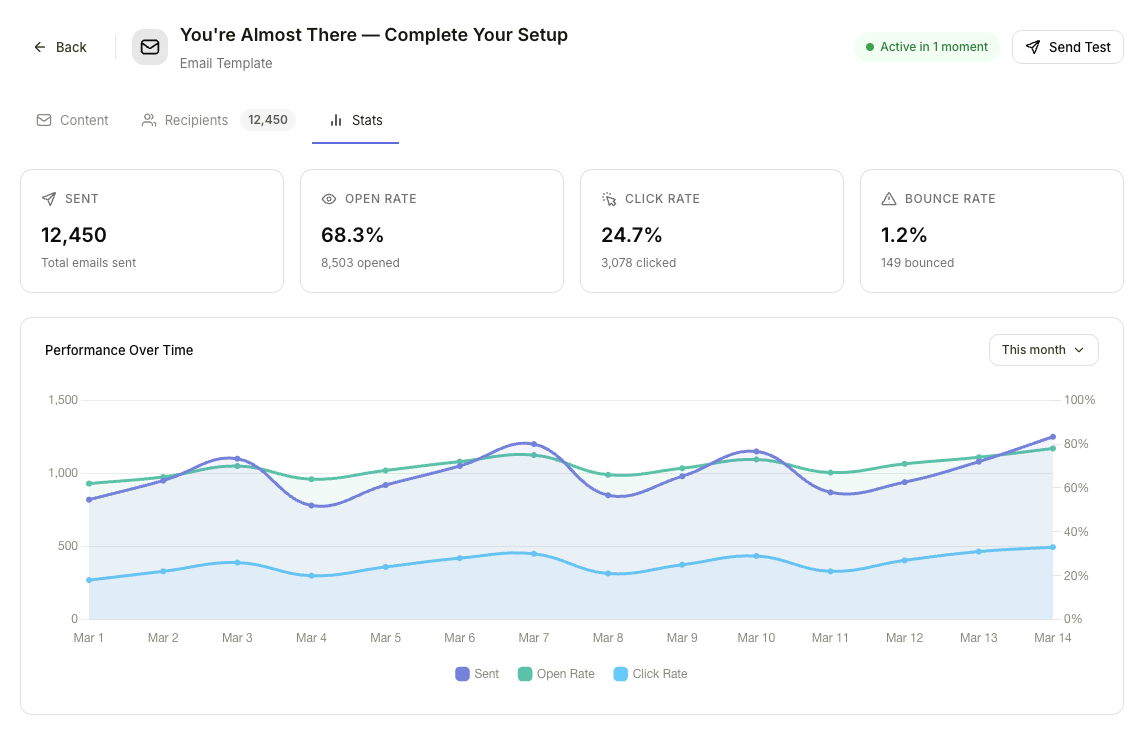
Moments
Lifecycle automation system that triggers actions when important events happen. Comes with default moments for trial activity, product usage, and plan limits.Moment Actions
When a moment triggers, automatically take action — send a Slack message, create an Attio task, fire a webhook, or send an email.Email Open & Click Tracking
Track when recipients open your emails and click links, so you can measure engagement directly in Bigdelta.Activities, Email Editor & Templates
A new system for defining and tracking account activities, plus a built-in email editor.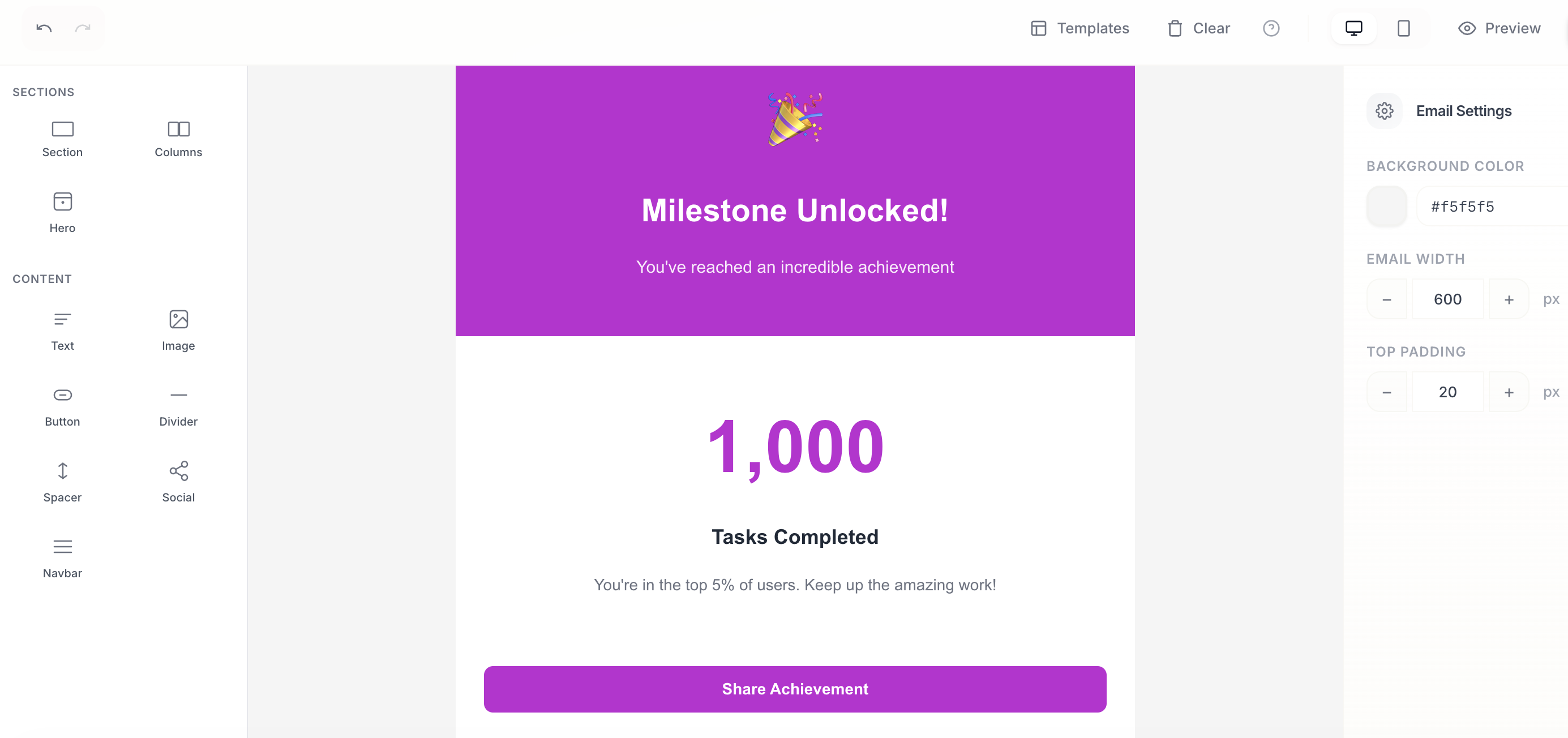
New features
Activity Definitions
Define and track key account activities across the lifecycle — trial events, payment events, MRR movements, stage changes, product usage, feature adoption, feedback, and entitlements.Email Editor
Compose and send emails directly from Bigdelta with the new built-in email editor.Improvements
- Pinned filters in metrics for quicker access to your most-used views.
Payment Integrations & Automations
Expanded payment coverage with new integrations and quality-of-life improvements across the board.
New features
Solidgate Integration
Connect your Solidgate account to sync payment data directly into Bigdelta.Invoice Syncing for PayPal & Payme
PayPal and Payme integrations now sync invoices alongside existing payment data.Improvements
- Stripe sync improvements for more reliable data.
- Smooth chart animations across dashboards and reports.
- Integration connect flow redesigned for a cleaner setup experience.
Dashboards, Companies & Invoices
New dashboards for business reviews, a company object to group accounts, and deeper payment integration.
New features
Dashboards
Business review and weekly pulse dashboards to help you stay on top of key metrics at a glance.Metric Widgets
Redesigned metric widget with breakdowns, compare mode, and relative time ranges for more flexible analysis.Companies
New company object with linked accounts, giving you a top-level view of organizations. MRR is now tracked at the company level.Invoice Syncing
Stripe integration now syncs invoices automatically.Improvements
- Data model page reworked for clarity.
- New team member invitation flow.
Introducing Bigdelta 2.0
Major update to the product that automates lots of busywork around customers.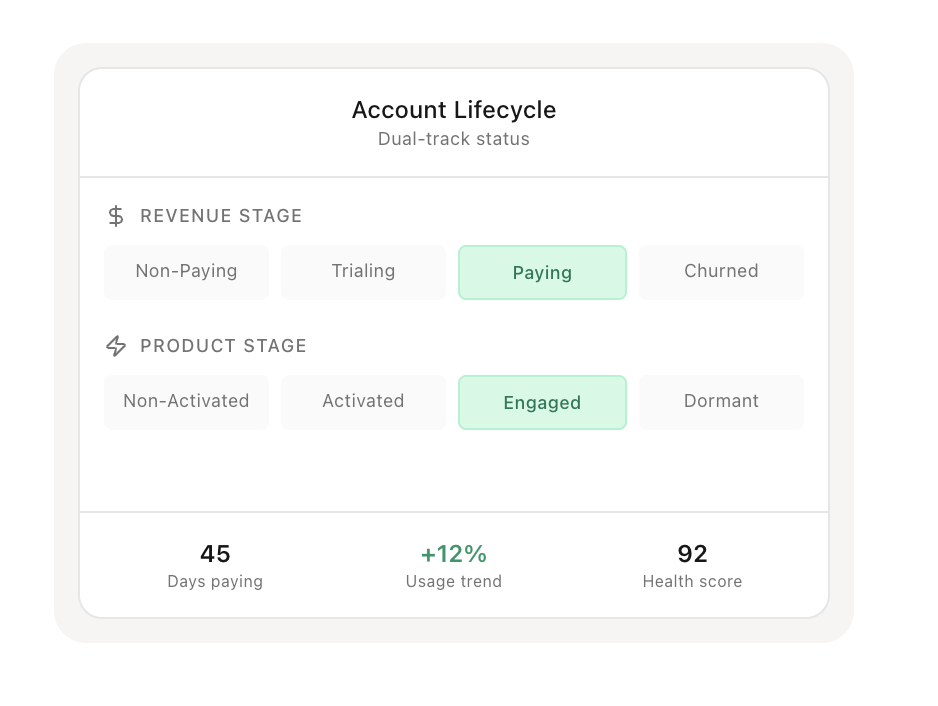
New features
Bigdelta Agents
AI agents continuously monitor each account to spot meaningful changes without manual work.Account Lifecycle Tracking
Automatically track each account’s full revenue and product usage journey.Updated Profiles
Enhancements for companies, accounts, users, and subscriptions with emphasis on clarity.Feedback
Incorporate and evaluate customer feedback directly within the platform.Activity Feed
A central place to see what customers are doing using product tracking, feedback and billing data.Improvements
- Record view switching relocated from dropdown menu to sidebar navigation.
- Event feed receives a dedicated page.
Fixes
- Minor bugs addressed.