
What is Feature Adoption?
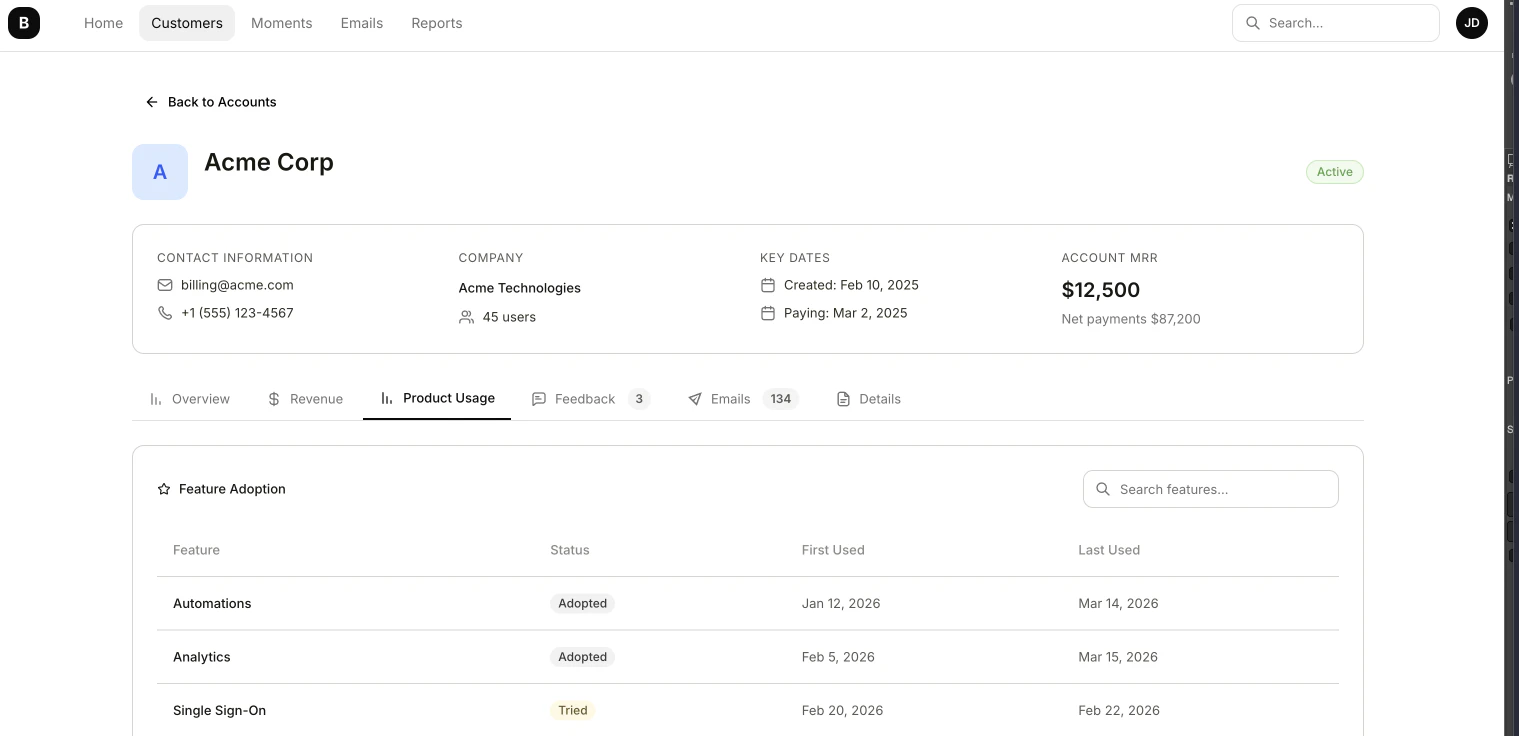
Adoption statuses
Each feature record is assigned one of four adoption statuses based on usage patterns:| Status | Meaning |
|---|---|
| Never | The account has never used this feature |
| Tried | The account has used this feature at least once but hasn’t fulfilled adoption rules |
| Adopted | The account uses this feature regularly — it is part of their workflow, you can change the rules in Settings > Features |
| Dropped | The account previously used this feature but has stopped |
How adoption is calculated
Feature Adoption is derived from the product usage events your application sends to Bigdelta. As user activity changes, adoption statuses update automatically:- A user tries a feature for the first time — status moves to Tried
- The user continues to use the feature regularly — status moves to Adopted
- Usage of a previously adopted feature stops — status moves to Dropped
Feature Adoption requires event tracking to be set up. You need to setup feature and send product events that identify which features are being used so that Bigdelta can calculate adoption statuses.
Where Feature Adoption appears
Feature Adoption data is visible in:- Records list — View feature records with their adoption status, filter and sort to find patterns across accounts
- Account profiles — See which features each account has adopted on the Product Usage tab
Feature Adoption Settings
Configure feature adoption settings in your workspace.