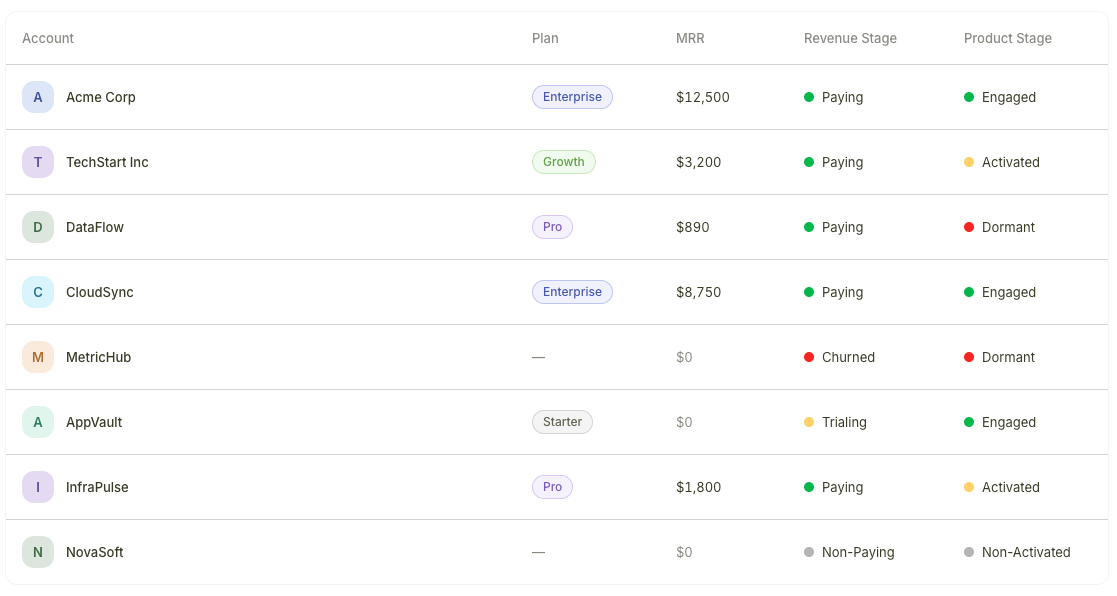
Two dimensions of account health
Bigdelta assigns each account two independent stages that together give you a complete picture of customer health:
- Revenue Stages reflect payment status — whether an account is paying, trialing, or has churned
- Product Stages reflect product engagement — whether an account is actively using your product or has gone quiet
| Revenue Stages | Product Stages |
|---|
| Based on | Billing data from your payment provider | Product usage events from your tracking integration |
| Setup | Automatic once a payment provider is connected | Requires event tracking to be installed |
| Stages | Paying, Trialing, Non-Paying, Churned | Engaged, Activated, Non-Activated, Dormant |
Why both matter
Each dimension tells you something the other cannot. The most actionable insights come from combining them:
| Revenue Stage | Product Stage | What it means | Suggested action |
|---|
| Paying | Engaged | Healthy account — paying and using the product | Monitor for expansion opportunities |
| Paying | Dormant | Churn risk — paying but not using the product | Reach out to re-engage before they cancel |
| Trialing | Engaged | Strong conversion candidate — actively exploring | Nurture toward a paid plan |
| Trialing | Non-Activated | At-risk trial — signed up but not using the product | Trigger onboarding nudges |
| Churned | Engaged | Win-back opportunity — cancelled but still logging in | Reach out with a tailored offer |
Create saved views filtered by stage combinations to keep your highest-priority segments visible. For example, a “Paying + Dormant” view surfaces churn risks, and a “Trialing + Engaged” view highlights your best conversion candidates.
Where stages appear
Both Revenue Stages and Product Stages are visible in:
- Accounts list — Stage columns appear in the table view for scanning at a glance
- Account profiles — Both stages are displayed on each account’s profile page
You can filter and sort by either stage in any account view.
Learn more