
What are Revenue Stages?
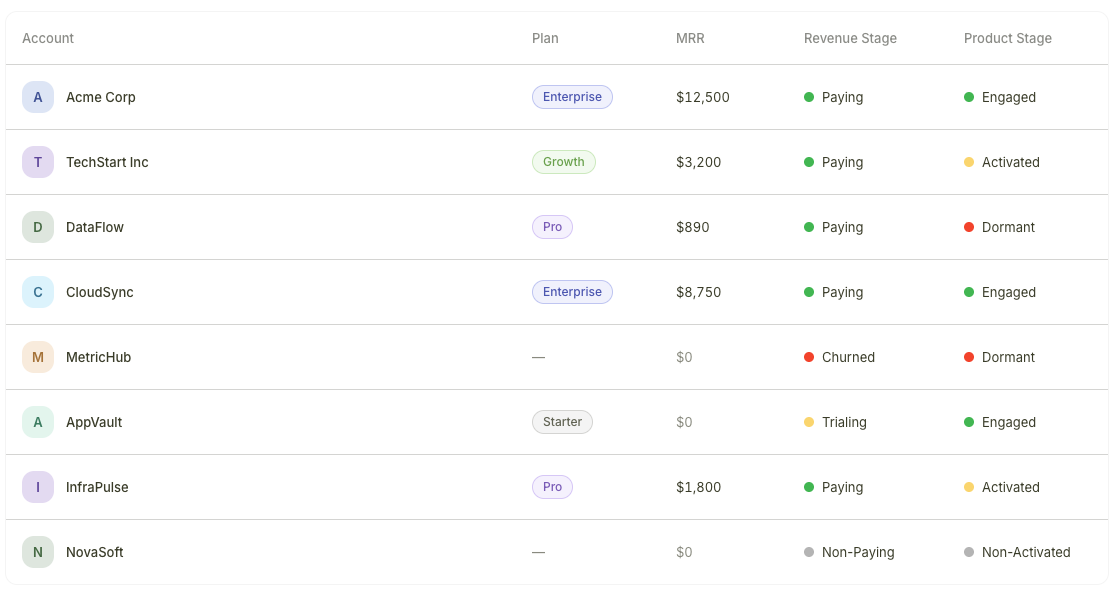
Accounts list showing the Revenue Stage column with different values
The four Revenue Stages
How Revenue Stages are assigned
Revenue Stages are derived entirely from your billing data. As billing events occur, stages update automatically:- A new subscription is created — the account moves to Paying
- A trial begins — the account moves to Trialing
- A trial expires without conversion — the account moves to Non-Paying
- A paid subscription is cancelled — the account moves to Churned
You do not need to configure or manually assign Revenue Stages. They are calculated automatically from the data synced by your connected payment provider.
Where Revenue Stages appear
Revenue Stages are visible in two places:- Accounts list — A stage column appears in the table view, allowing you to scan the financial status of all accounts at a glance
- Account profiles — The stage is displayed on each individual account’s profile page
Revenue Stages vs. Product Stages
Revenue Stages tell you about payment status, while Product Stages tell you about product engagement. Together they give you the full picture of account health.Product Stages vs. Revenue Stages
Learn how to combine both stage types to identify churn risks, conversion candidates, and expansion opportunities.