
What are Product Stages?
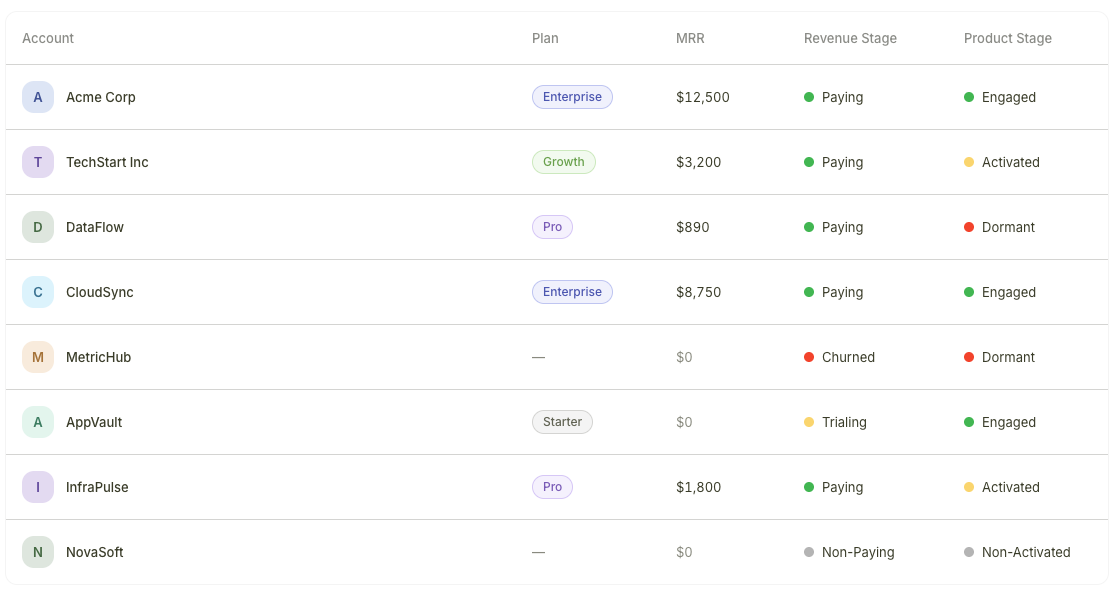
Accounts list showing the Product Stage column with different values
The four Product Stages
How Product Stages are calculated
Product Stages are derived from the events and usage data that your product sends to Bigdelta. As user activity changes, stages update automatically:- A new user signs up but has not performed key actions — Non-Activated
- The user completes activation steps — Activated
- The user shows consistent, healthy usage — Engaged
- Activity drops off significantly — Dormant
Product Stages require event tracking to be set up. You need to install your tracking key in your product so that usage data flows into Bigdelta. Without event data, Product Stages cannot be calculated.
Where Product Stages appear
Product Stages are visible in two places:- Accounts list — A stage column appears in the table view, so you can scan engagement levels across all accounts
- Account profiles — The stage is displayed on each individual account’s profile page
Product Stages vs. Revenue Stages
Product Stages tell you about product engagement, while Revenue Stages tell you about payment status. Together they give you the full picture of account health.Product Stages vs. Revenue Stages
Learn how to combine both stage types to identify churn risks, conversion candidates, and expansion opportunities.
Getting started with Product Stages
1
Install event tracking
Add the Bigdelta tracking key to your product so that usage events are sent to your workspace.
2
Verify events are flowing
Check the Events tab on any account profile to confirm that product usage data is being received.
3
Review Product Stages
Once events are flowing, Product Stages will be calculated and assigned automatically. View them in your accounts list or on individual profiles.